Visitor Management
Structured Entry for People & Vehicles
Teams
1 Designer, 1 PM, 2 APM, & 20 DEv
Jan - aug 2025
Asbl, Finance
WEB & Mob · OPERATIONS · SECURITY · CONSTRUCTION · 10–15 MIN READ
Building a 0→1 System for
Real-Time Entry Control at Construction Sites
When I started working on Visitor Management, what struck me was how basic and fragile the current flow was. Everything depended on phone calls, paper logs, and assumptions.
Security didn’t know who was allowed.
Admins didn’t know who was in.
Engineers didn’t know when material actually arrived.
And everyone worked in silos.
This case study is about how I redesigned the entire visitor experience for people, contractors, and material vehicles; so construction sites could run with clarity, speed, and trust.
Building Context
guesswork, delays, and too many assumptions at the site gate
Our visitor process looked manageable from the outside, but the reality on site was messy and unpredictable. Security depended on calls to confirm approvals, admins relied on memory to track who was inside, and project teams had no real-time view of material arrival. Labour counts came in wrong, PO/WO mismatches stopped vehicles at the gate, and there was no proper audit trail of movement in and out. People were entering, but visibility wasn’t.
Security second-guessed every entry.
Admins spent time clarifying basic details.
Vehicles and vendors waited longer than needed.
It wasn’t a workflow, it was a workaround.
Understanding the Goal
Operational Clarity, Approval Discipline, and Real-Time Site Visibility
We wanted to replace gate-level guesswork with a clean, predictable visitor flow.
The aim was simple: give security a real-time view of who’s coming in, give admins approvals with proper context, and give project teams clarity on staff, contractors, and material vehicles without relying on calls.
In short, the goal was to reduce risk, speed up entries, and make site visibility real-time instead of reactive.
High-level impact
first 2 weeks post-launch
Once the Visitor Management system went live, the change was clear. Security finally had real-time visibility, so approvals didn’t depend on calls anymore. Admins got complete context for each request, which made decisions faster and prevented common mistakes. Contractor entries became smoother, material vehicles stopped getting stuck because PO issues surfaced upfront, and every check-in/check-out was logged automatically. What used to feel manual and uncertain turned into a simple, predictable flow that teams could rely on every day.
My Role
I led the 0→1 product and UX work for Visitor Management and Visitor Tracker from understanding how security and admins were actually handling entry, to defining flows, states, and edge cases for staff, contractors, visitors, and material vehicles.
I worked closely with operations, project teams, and product to turn offline, ad-hoc workflows into a structured system.
Why This Mattered?
Understanding user

Security guards
at project sites
Handling check-ins, check-outs, and basic validations at the gate.

Admins / project coordinators
aSBL Head-office
Approving visitors, contractors, and vehicles; managing project-level configs.

Project managers
aSBL Head-office
Wanting visibility into who is on-site, and how material is moving.

Contractors, vendors, and drivers
at project sites
Needing predictable entry without unnecessary delays.
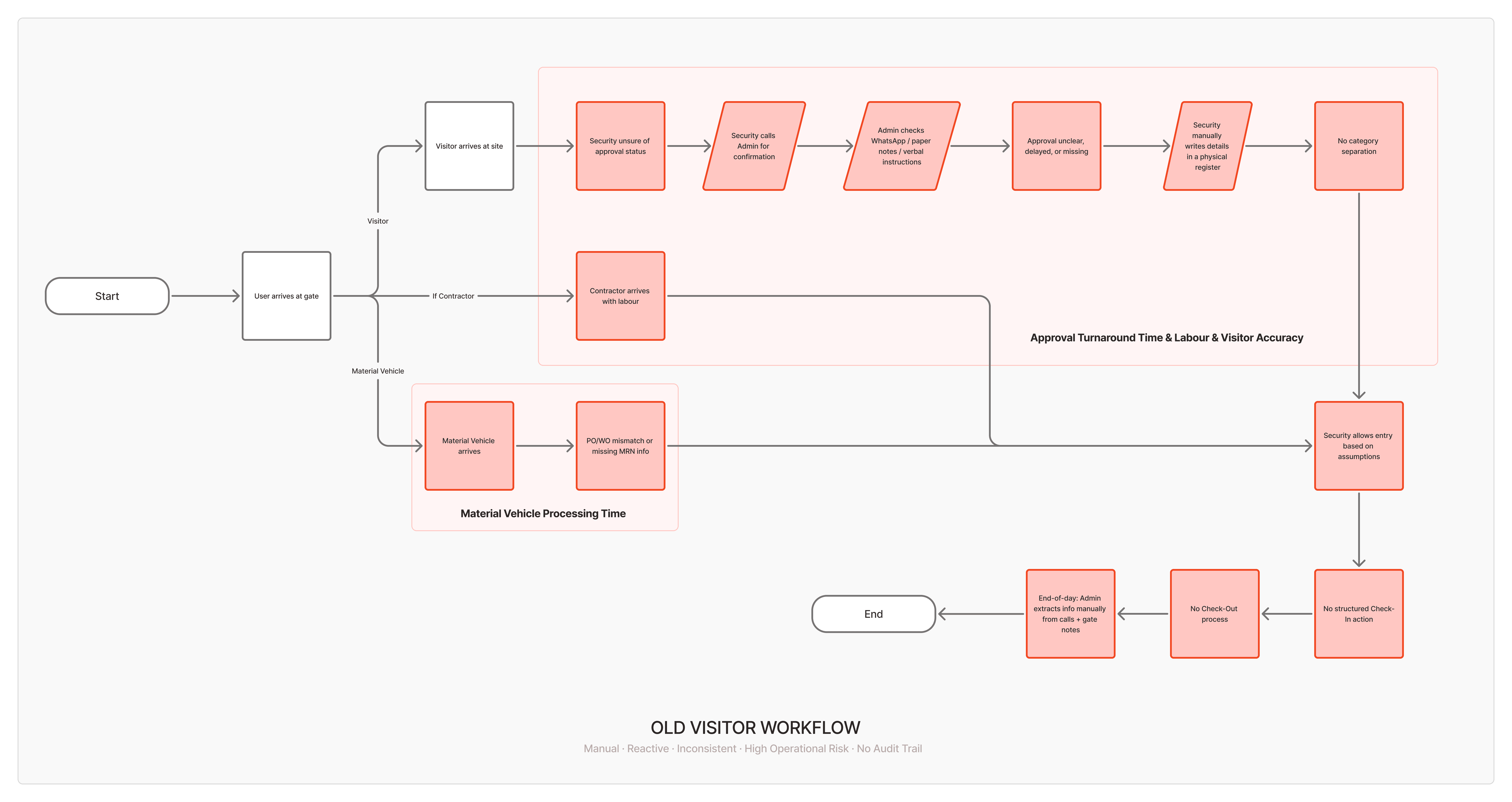
What Wasn’t Working Before!
Understanding user
Security guards
at project sites
Security had no real-time tracker, only calls, WhatsApp messages, and scattered lists.
Admins / project coordinators
aSBL Head-office
Admins approved people without full context, leading to inconsistent labour counts and no simple way to track contractor presence.
Project managers
aSBL Head-office
Material vehicles frequently got stuck at the gate due to PO/WO mismatches or unclear MRN requirements. There was no structured, audit-ready log of who entered, when they checked out, or which vehicle brought what.
The system wasn’t broken, it just didn’t exist yet in a way that supported the actual work happening at the gate.
Approach
Understanding user
Treating every entry as security, operations, and compliance at once
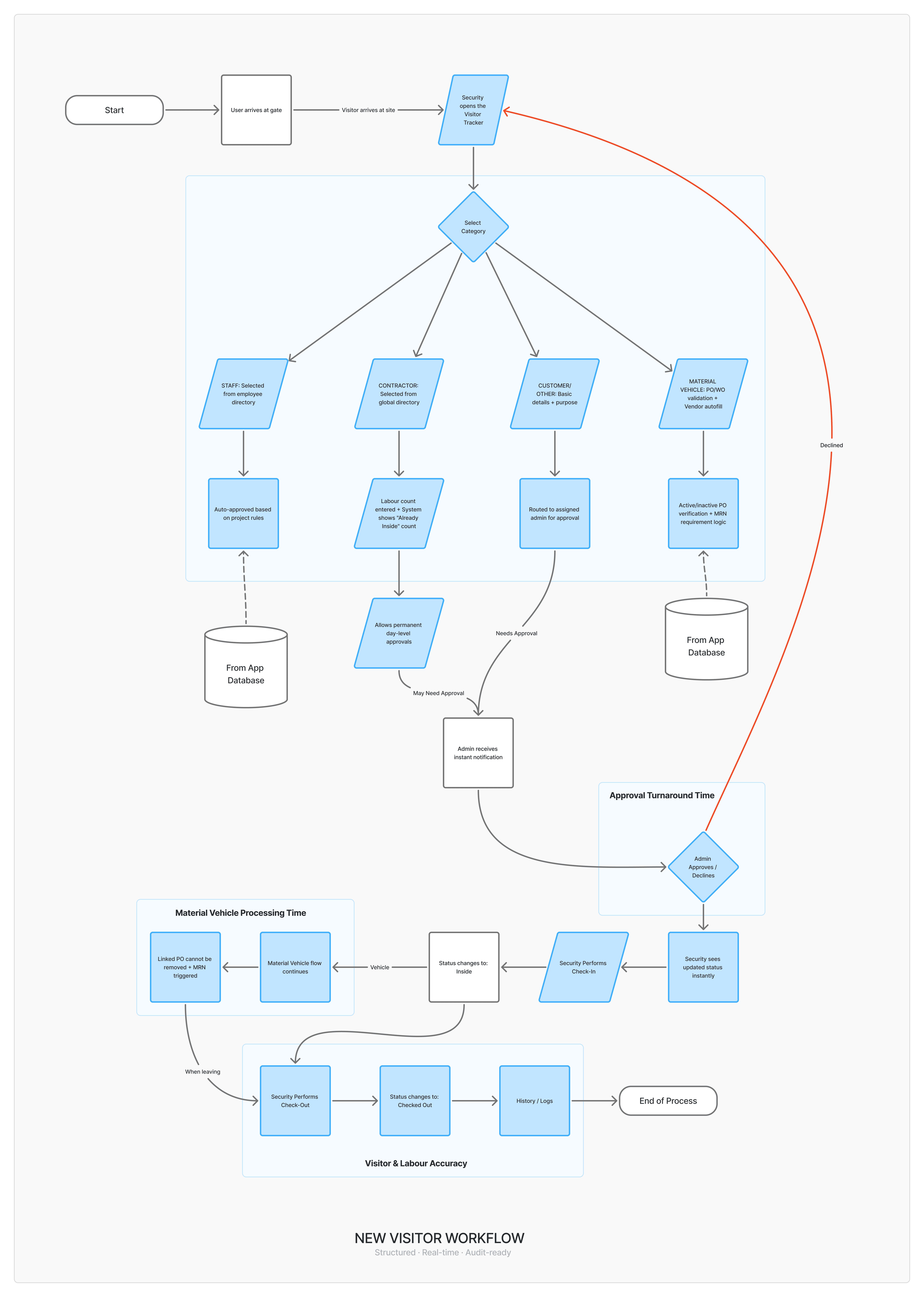
Because this was a 0→1 build, I didn’t start with screens. I started with how people actually handled entry today: the gate register, the calls, the contractor lists, the PO printouts.
My mental model
A visitor entering the site is a security decision, an operational event, and a compliance checkpoint at the same time.
Clear roles
Security, Admin, Staff, Contractor, Customer, Material Vehicle (ASBL/Other)
A predictable lifecycle
Request → Approve → Check-In → Check-Out → History
Opportunities
Real-time status
Security sees “who needs action right now” instead of guessing
Category-specific rules
Staff ≠ Contractor ≠ Material Vehicle
Audit-first history
Every action has a timestamp and status
What I Aimed to Solve,
My Hypotheses
reduce delays and calls
Hypothesis #1
If security and admins can see live visitor statuses, approvals don’t depend on phone calls.
Category-based rules, Reduce confusion
Hypothesis #2
If staff, contractors, and vehicles have tailored flows, security doesn’t have to improvise each time.
reduce disputes and uncertainty
Hypothesis #3
If every check-in and check-out is logged, no one has to guess who was inside or when.
What We Built,
The Solution
We didn’t try to redesign the gate experience, we built a proper system around how it actually works.
The goal was simple: give security real-time clarity, give admins context before approving anything, and make contractor and material-vehicle entries predictable instead of reactive.
So we broke the problem into parts, defined clear categories, and designed flows that match the everyday realities of a construction site. Here’s what the final solution looked like.
Visitor Categories & Configuration (Web)
We started by defining visitor types at the project level:
Staff
Contractor
Customer
Other
Material Vehicle (Other)
Material Vehicle (ASBL)
Each category has its own rules, approval requirements and assigned admins. This configuration layer is what lets the system treat a staff entry, a contractor entry, and a material truck entry differently without adding mental load for security.
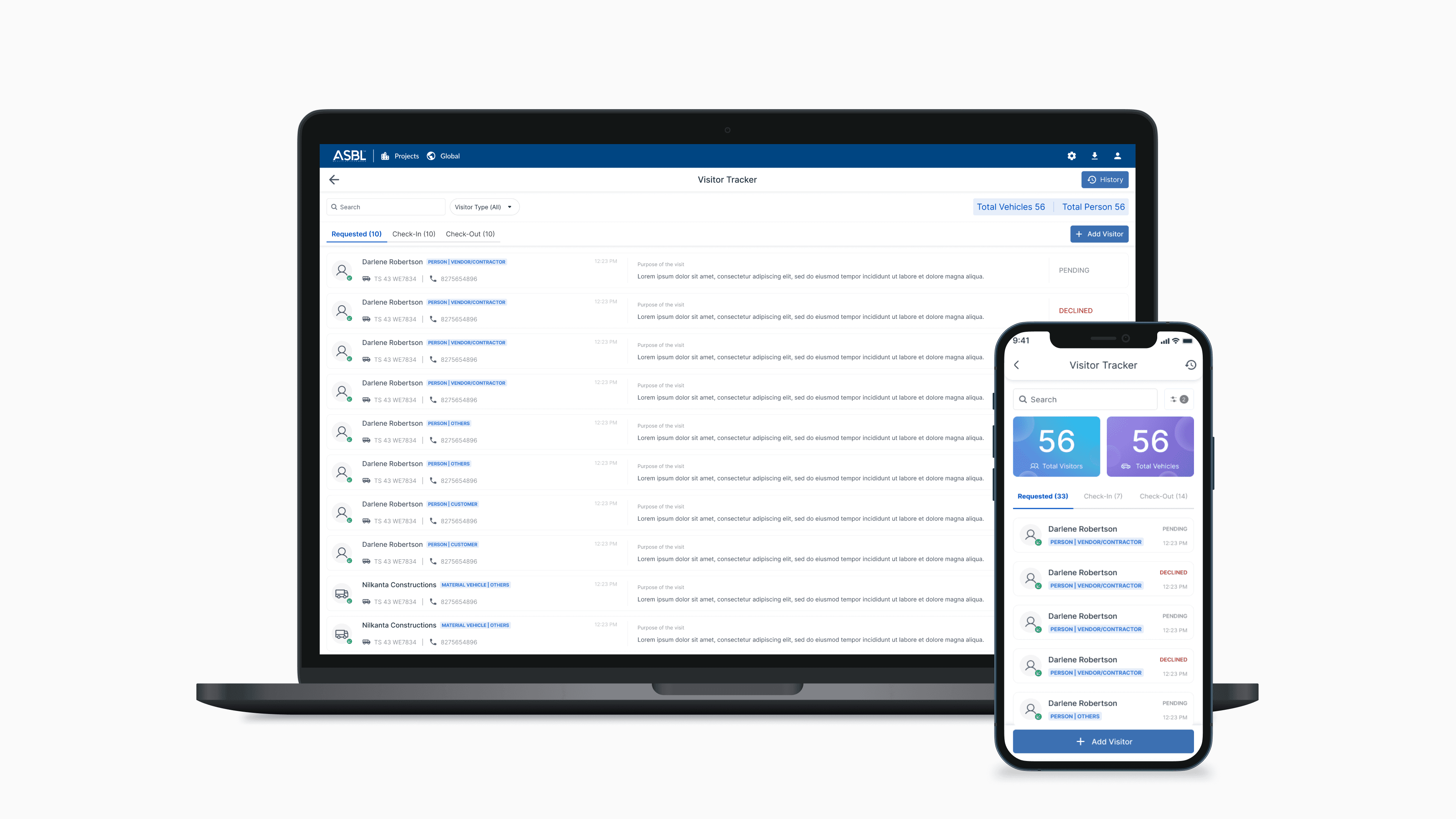
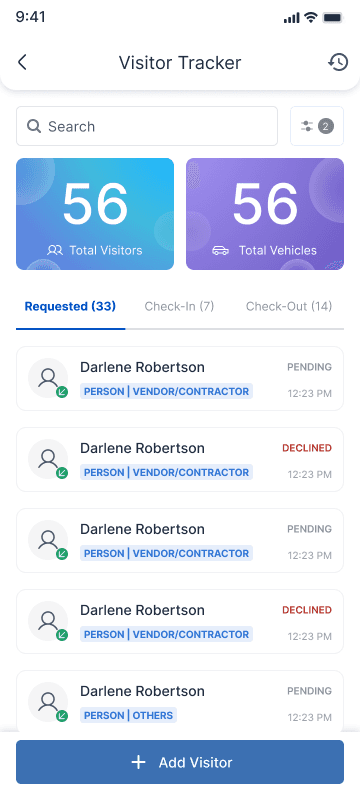
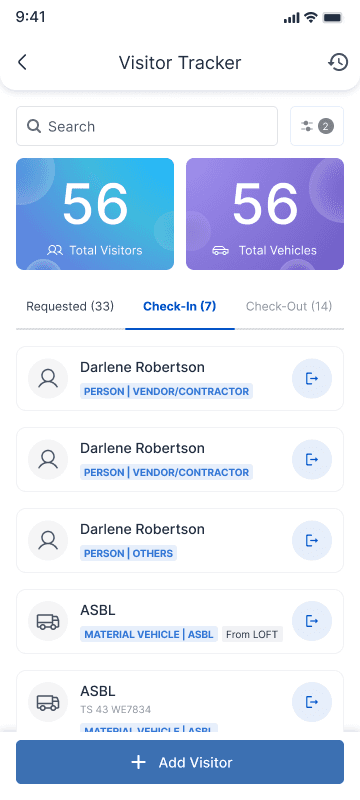
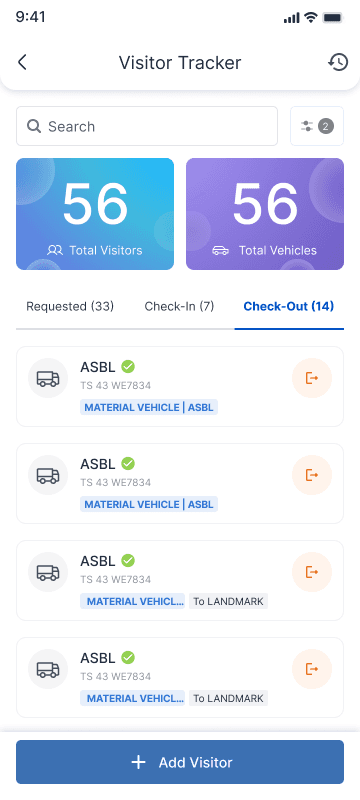
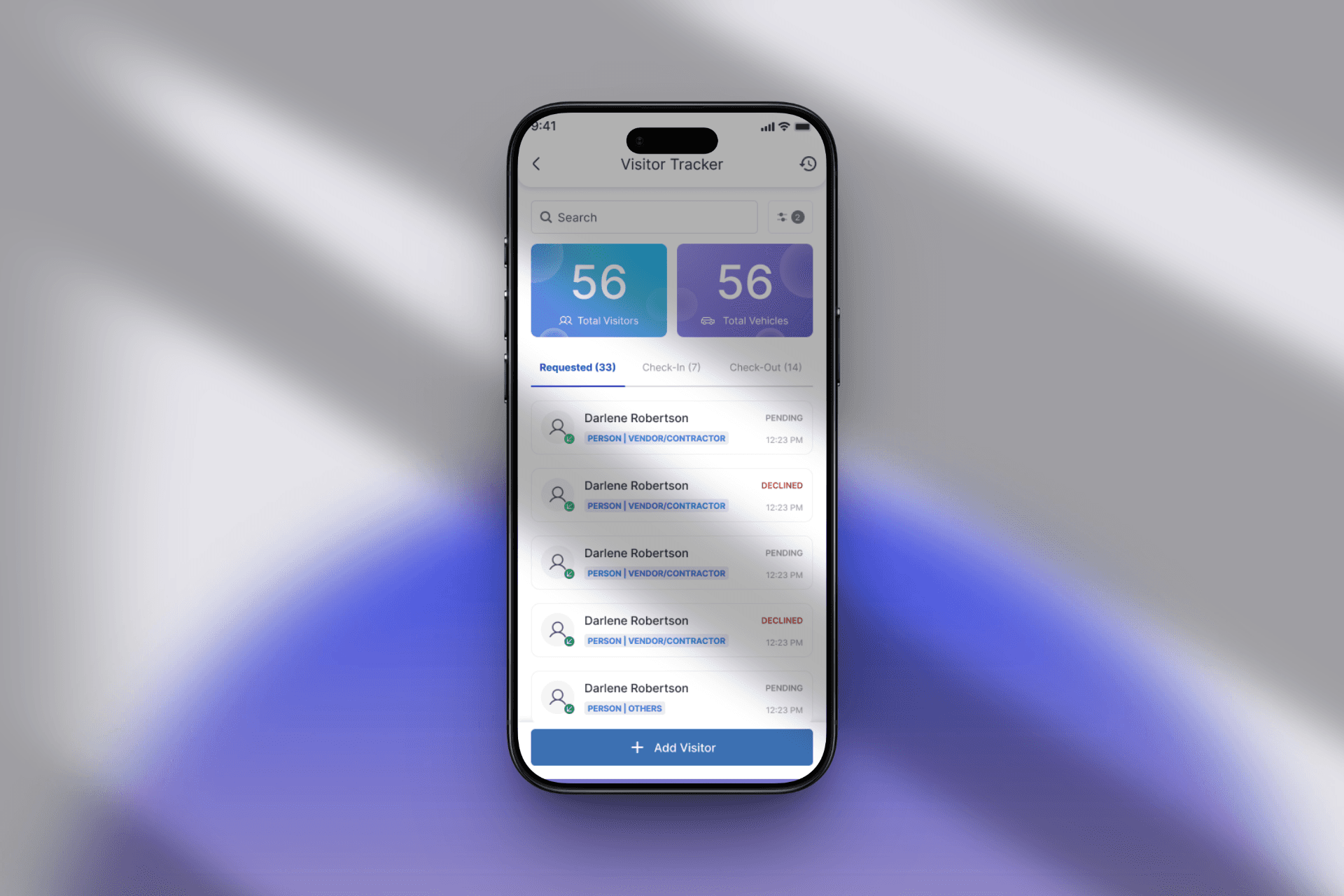
Real-time Visitor Tracker (Web + Mobile)
A single screen where security and admins can see:
Today’s visitors: (all movements for the day)
Tabs for: Requested, Checked In, Checked Out
Filters: Staff, Contractor, Customer, Material Vehicles
Search: name, contractor, vehicle number, etc.
This is the first place security looks now, not the phone.
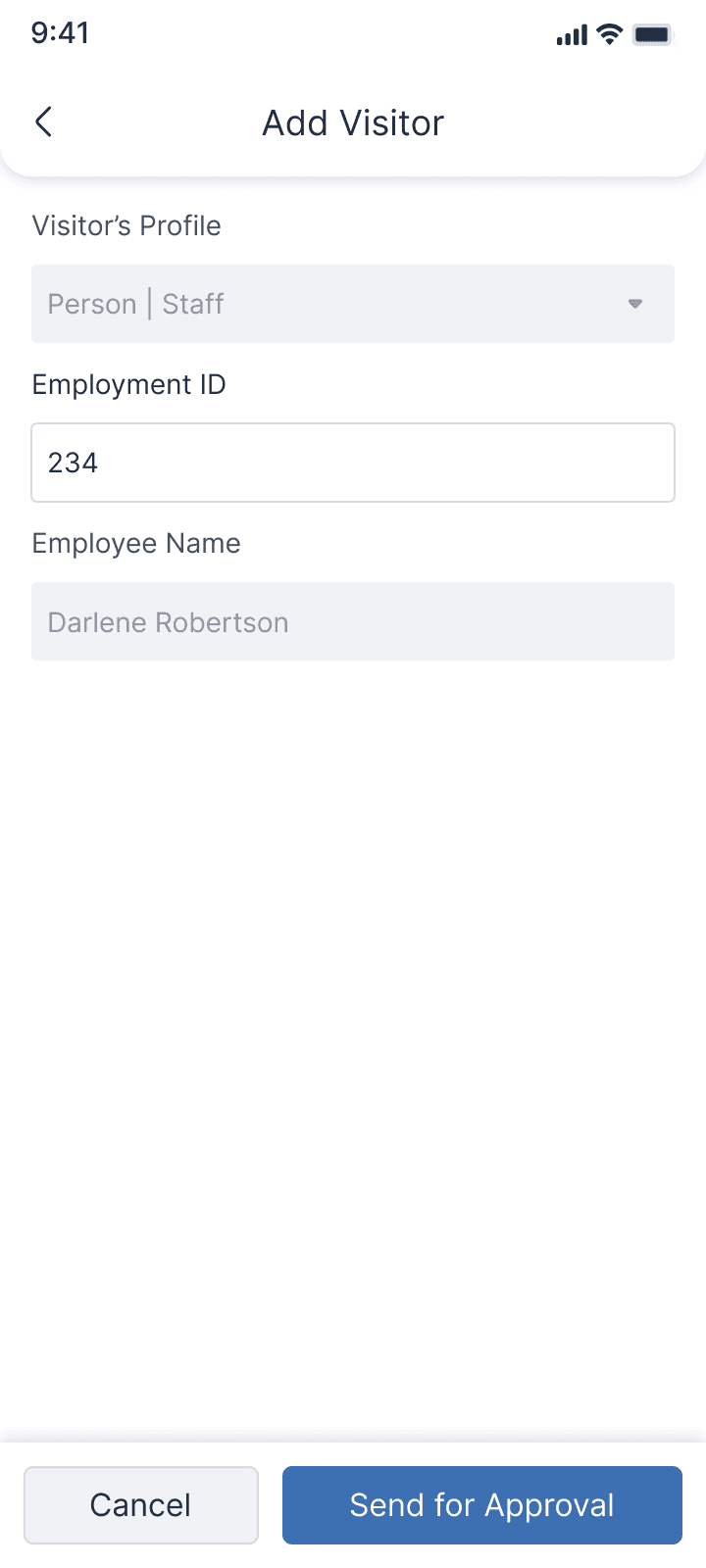
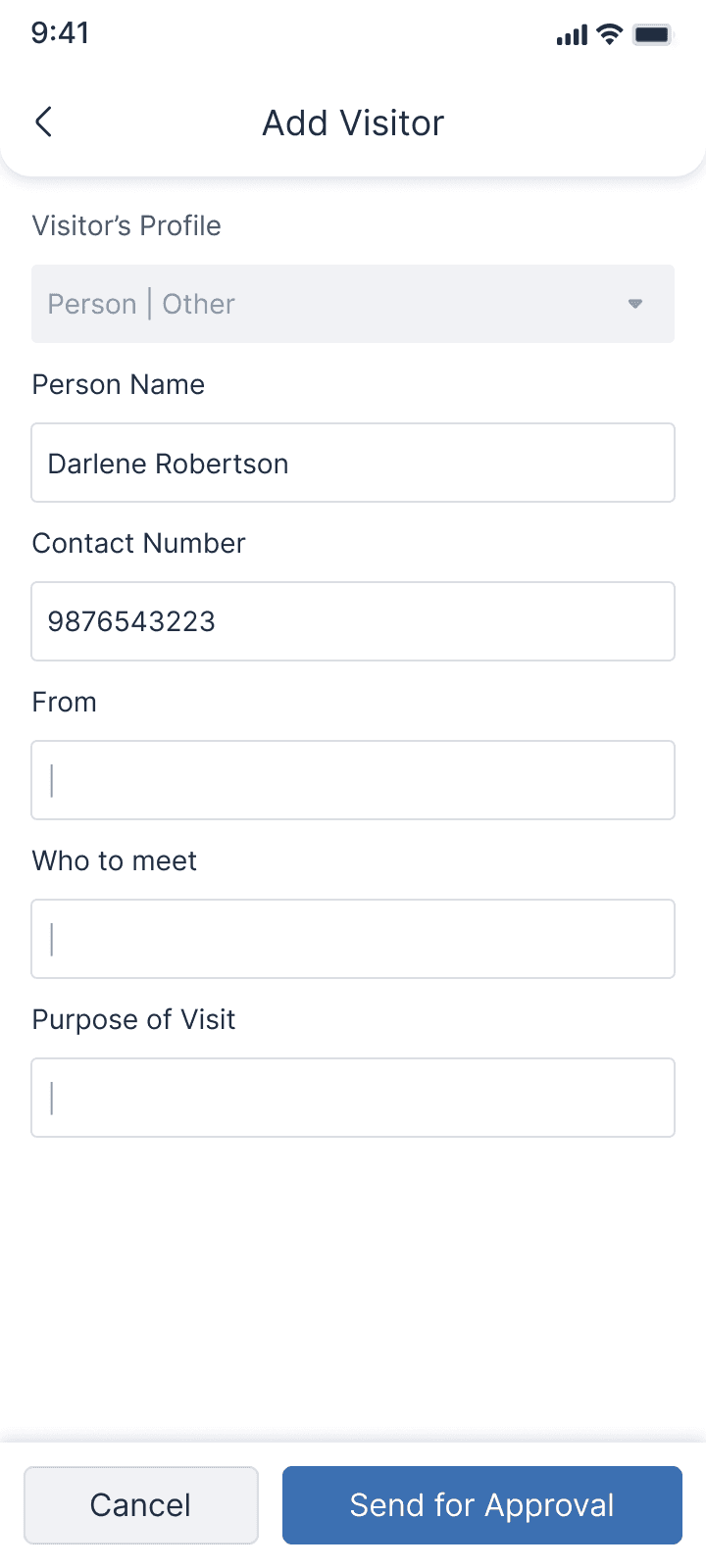
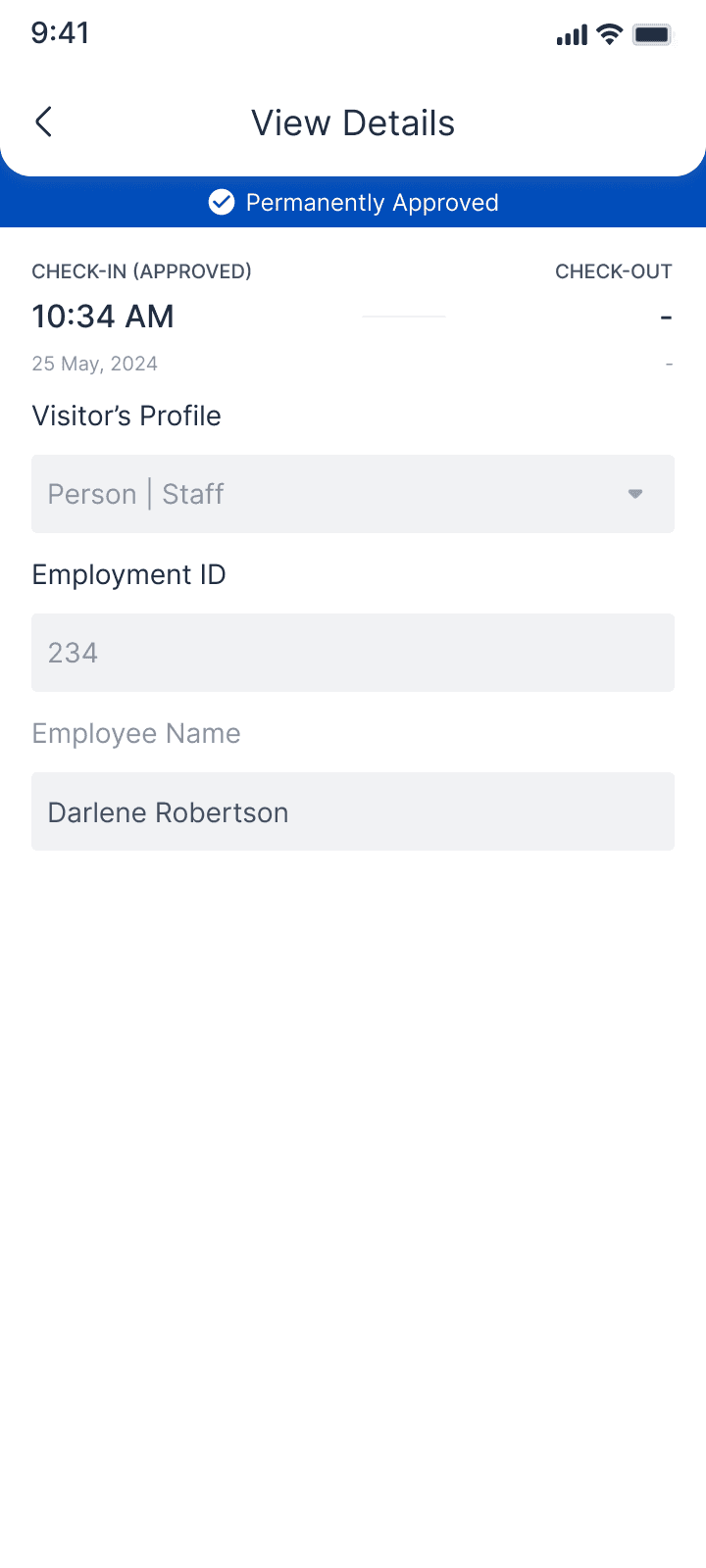
Staff Entry Flow
Staff are the simplest case, so we made this almost frictionless:
Staff are picked from the central employee directory
Entries are auto-approved based on rules
Multiple staff can be added in a single action
Check-in and check-out are fast and traceable
No more manual typing or repeated approvals for known employees.
Staff Entry Flow
Adding Visitors & Aduit Logs
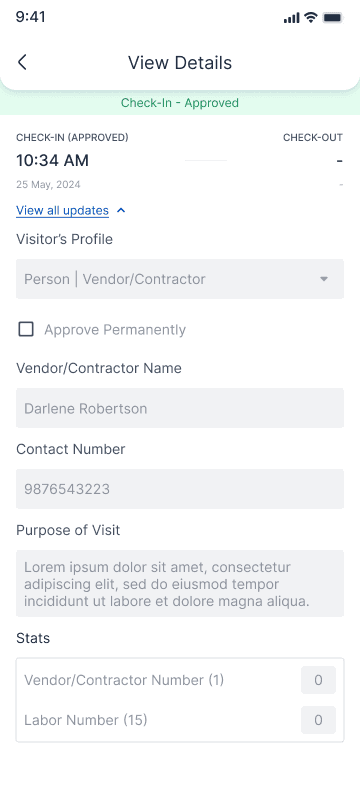
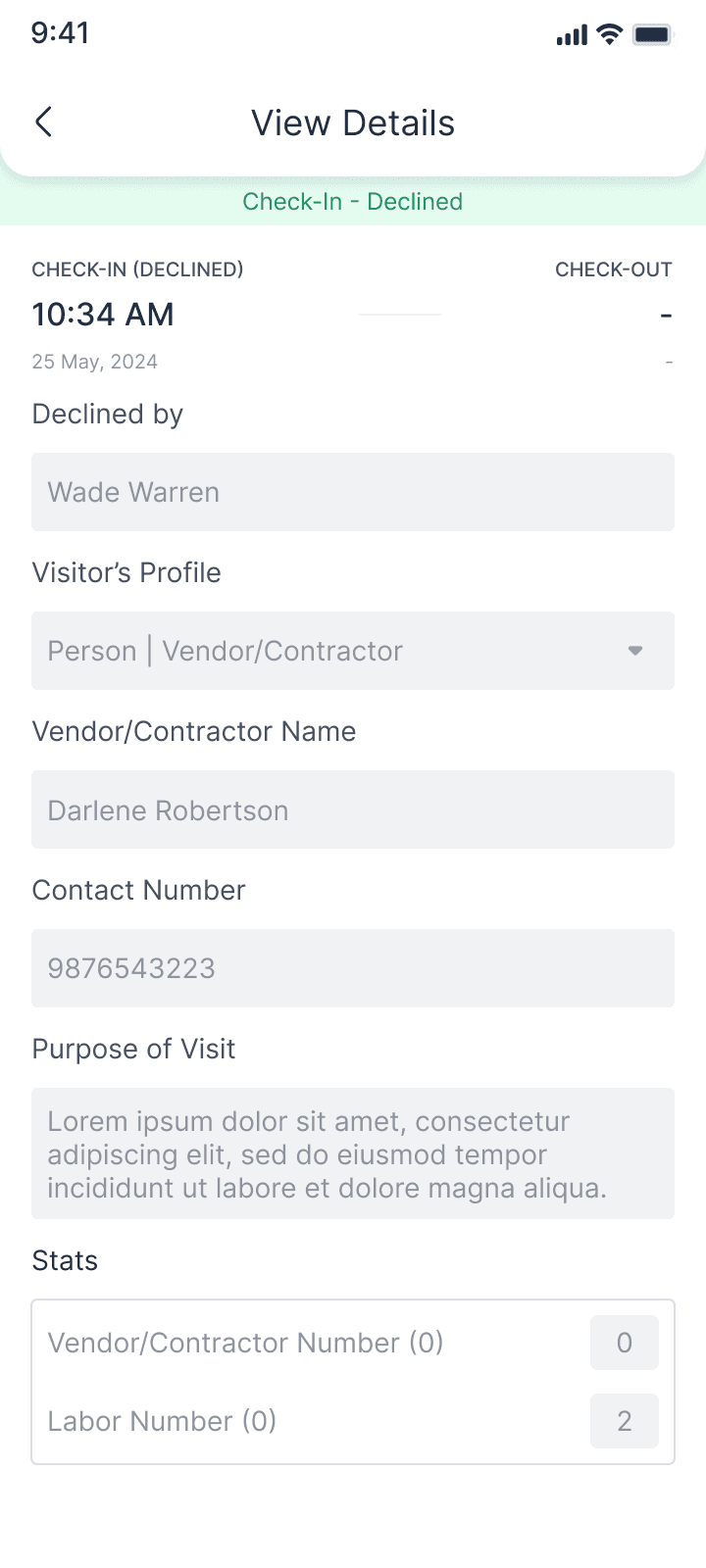
Contractor Entry Flow
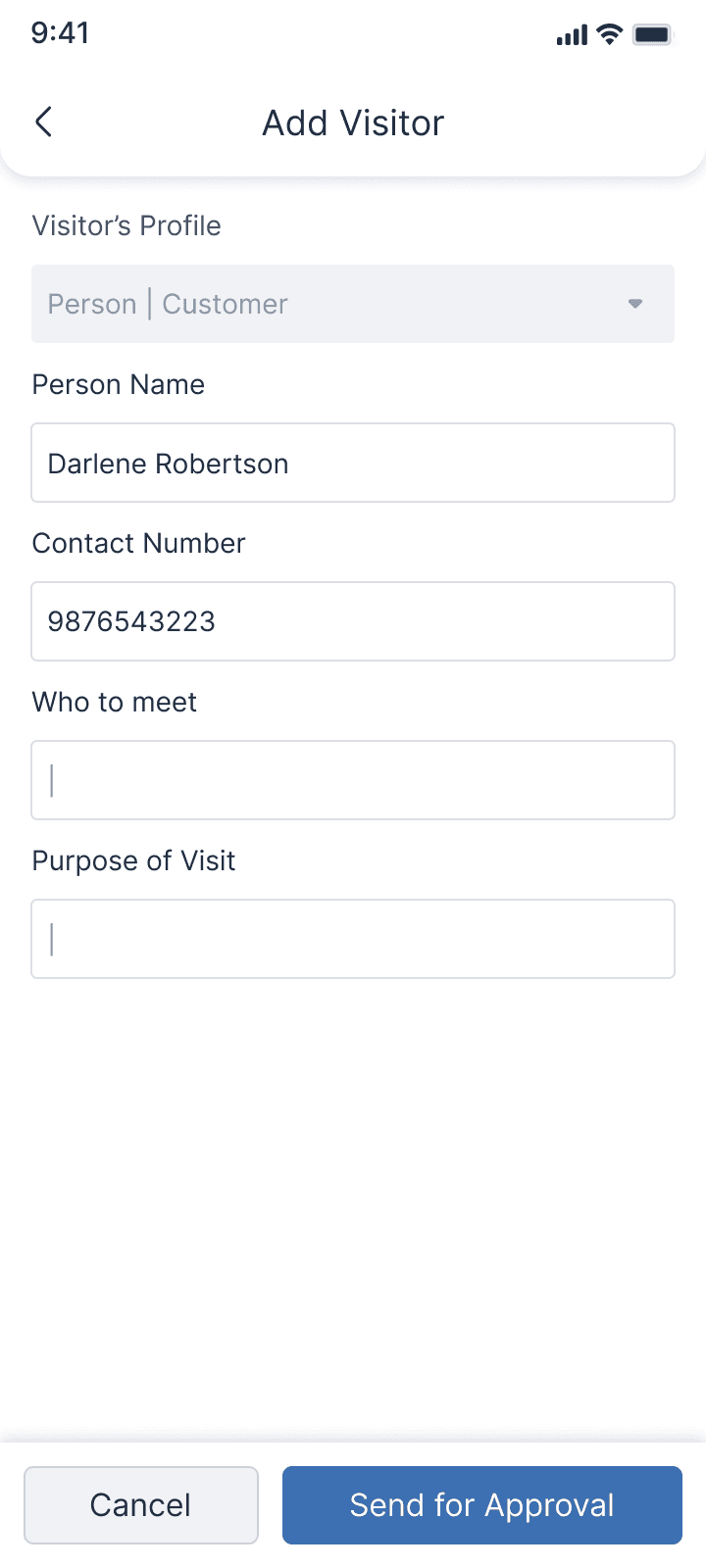
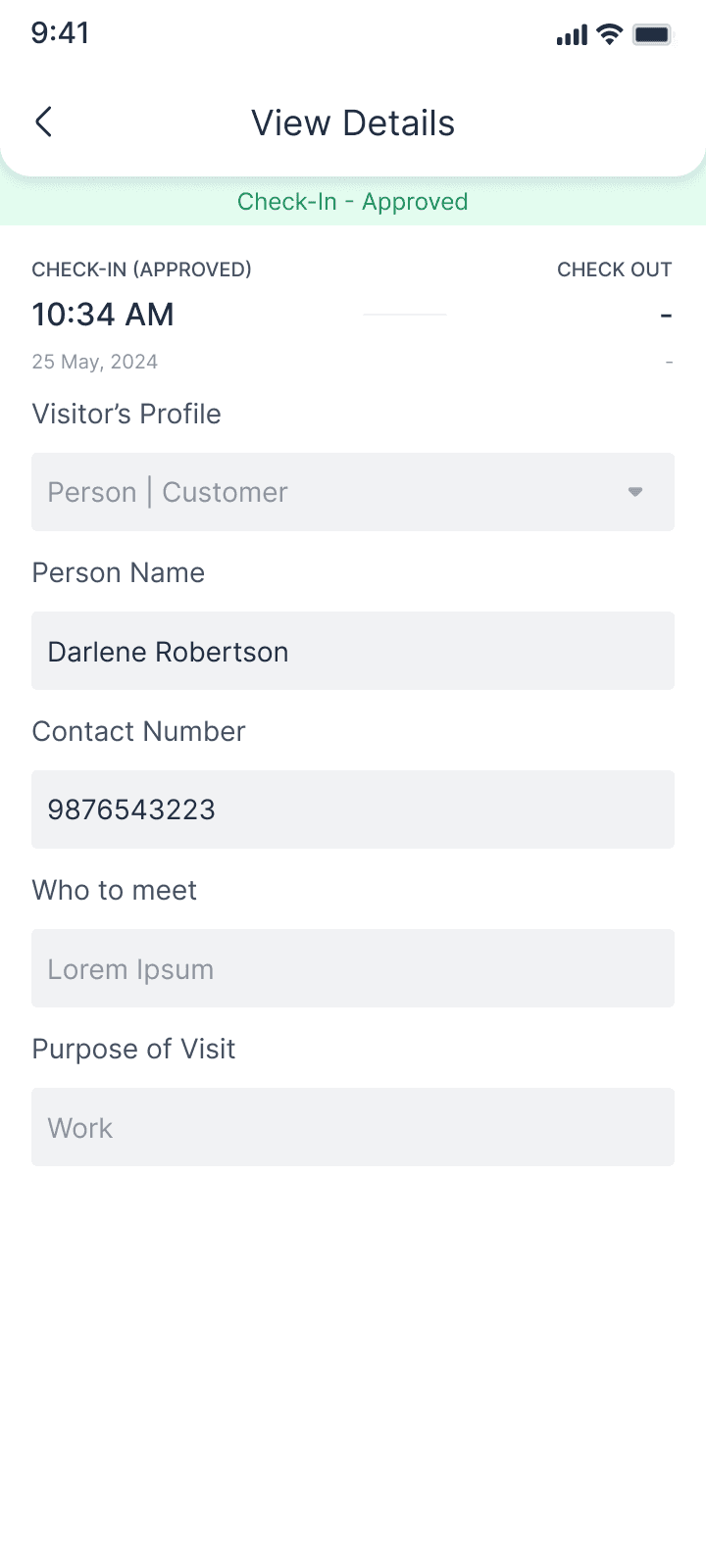
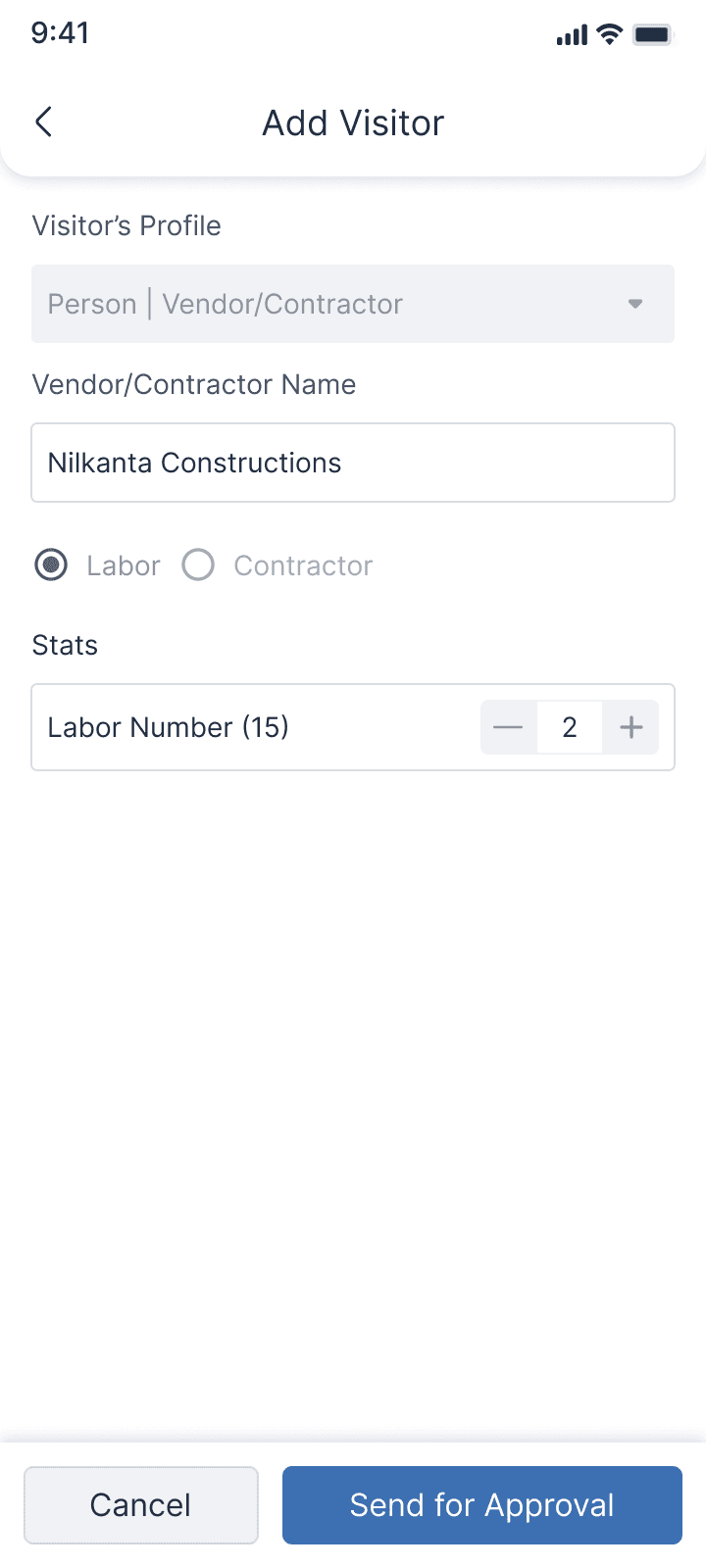
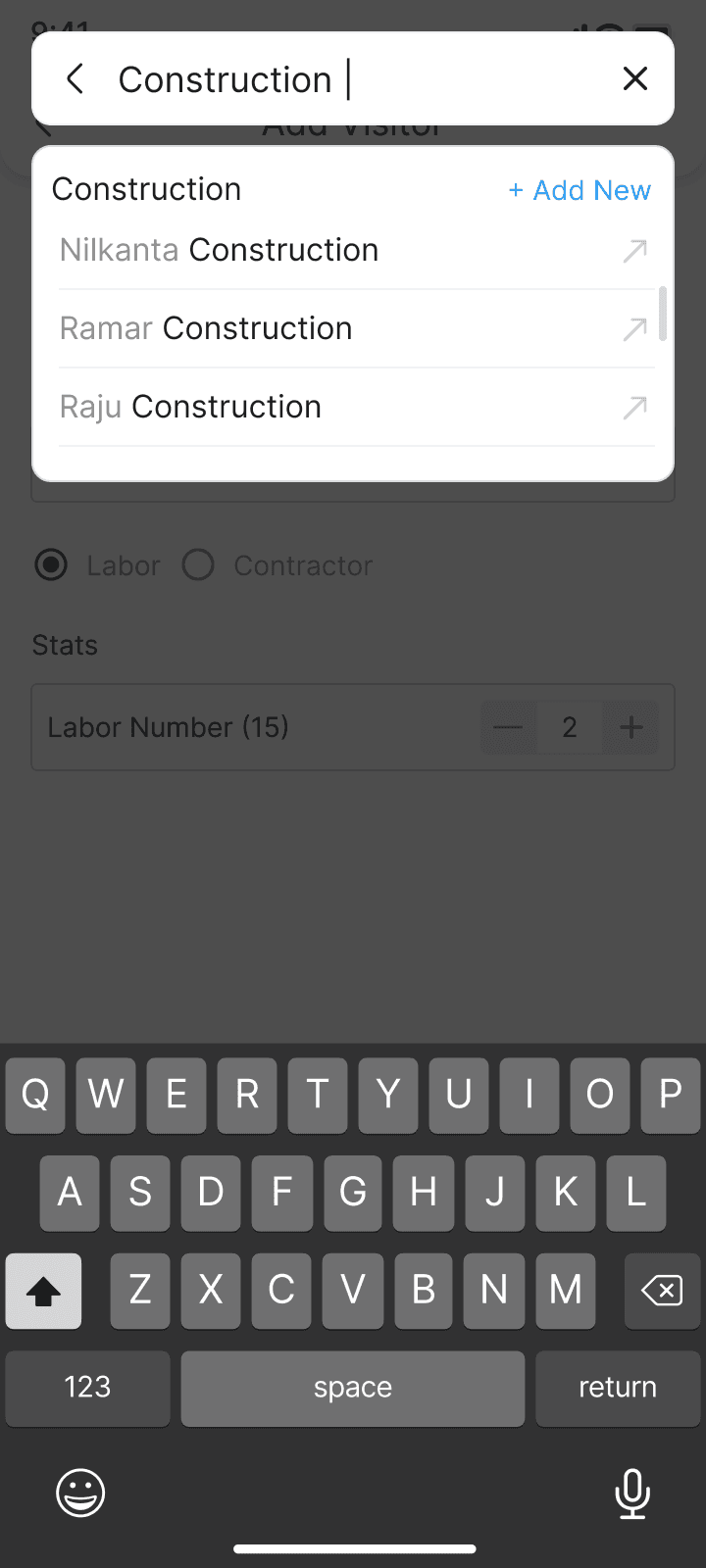
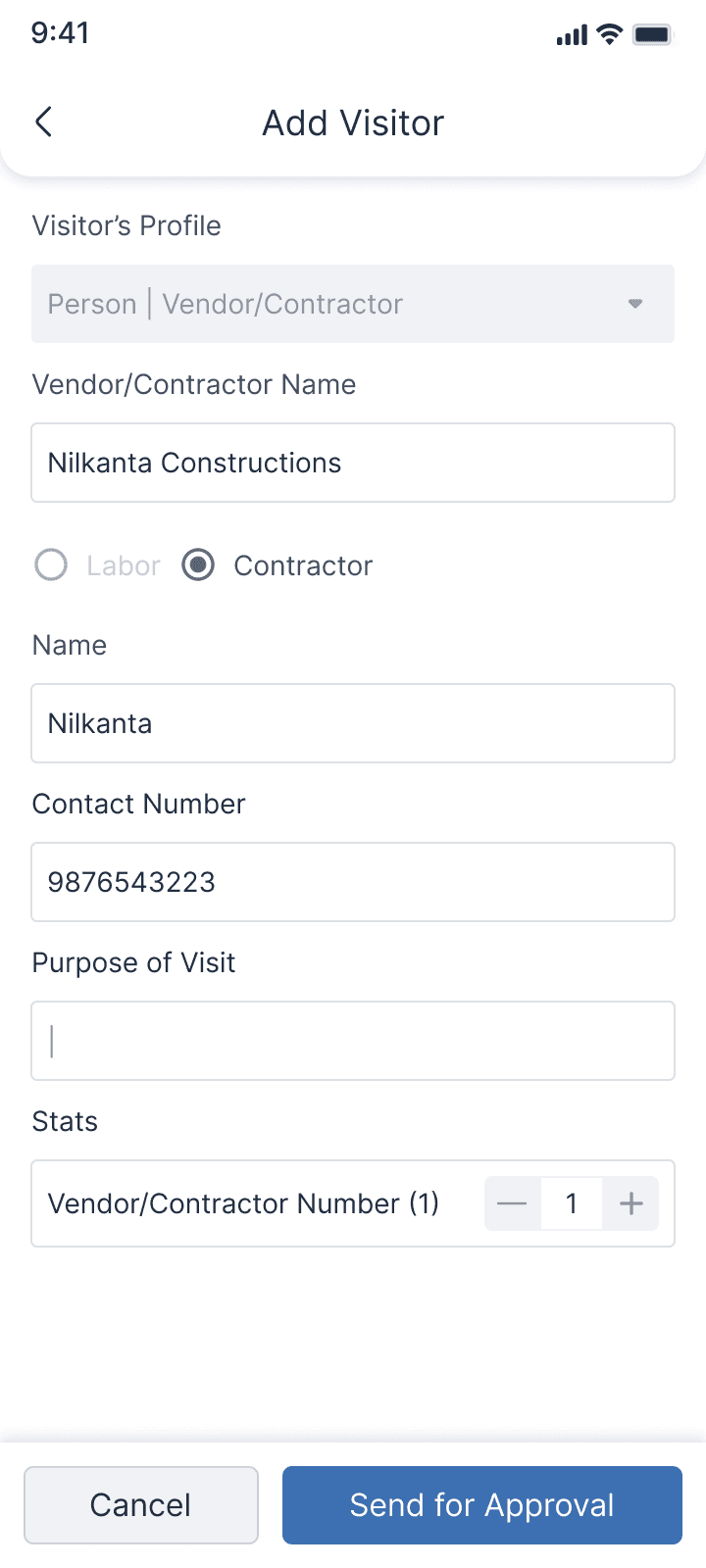
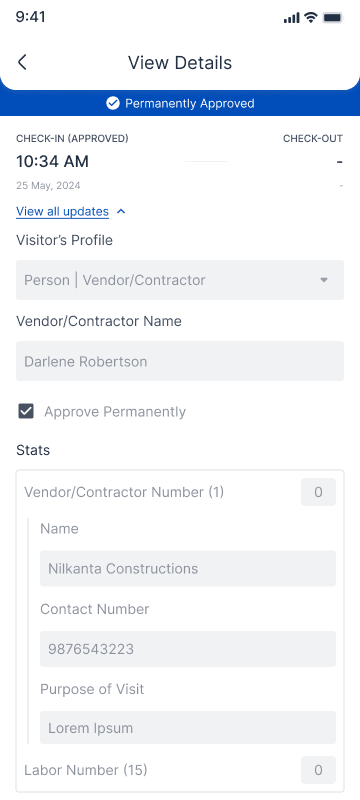
Contractors are where real complexity appears, especially labour counts.
The flow handles:
Selecting a contractor from a global contractor directory
Adding the expected labour count
Showing how many labourers from the same contractor are already inside
Allowing day-level or longer-term approvals for regular contractors
This gives security one clear question at the gate:
“Does this contractor have approval, and how many people from them should be inside right now?”
Contractor Entry Flow
Adding Visitors & Aduit Logs
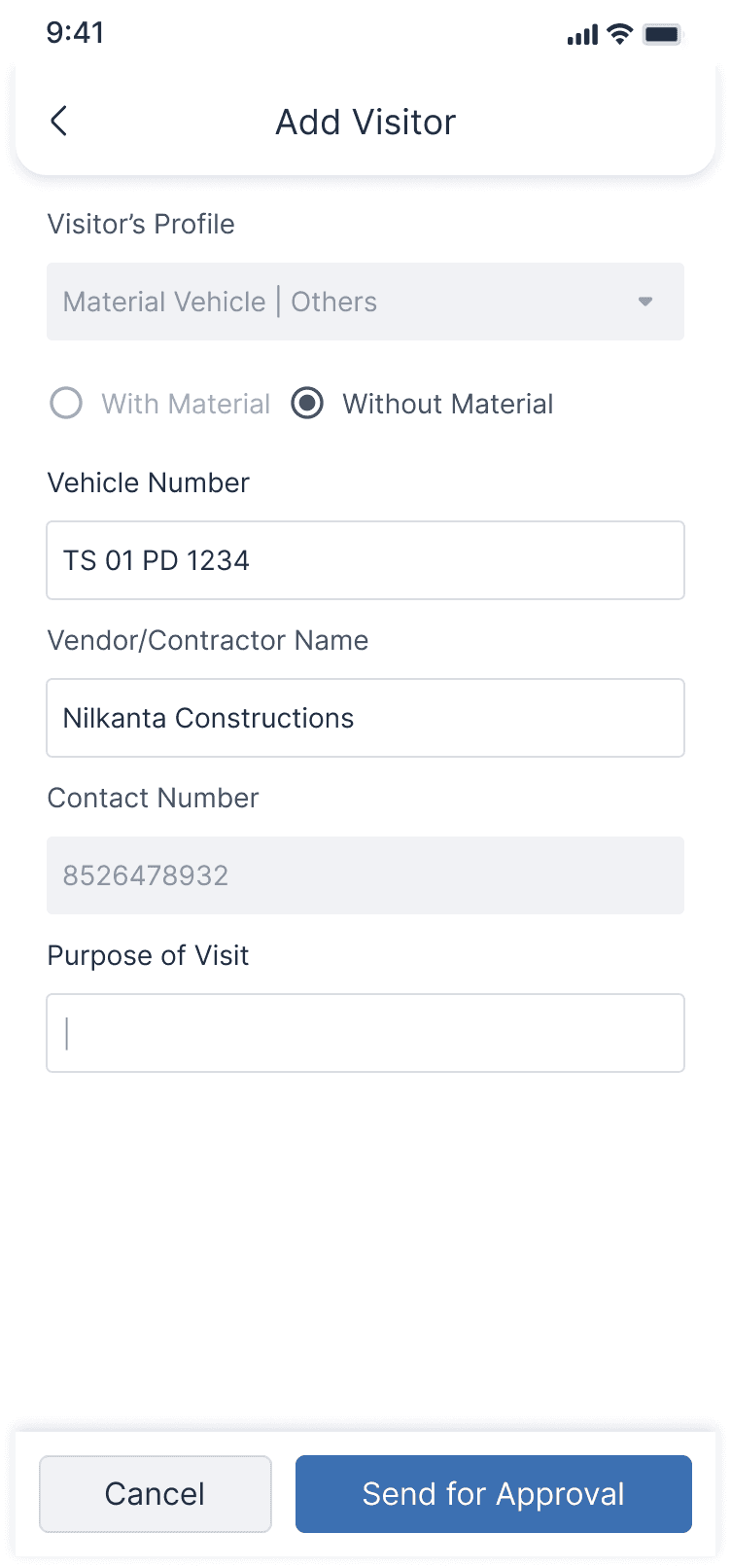
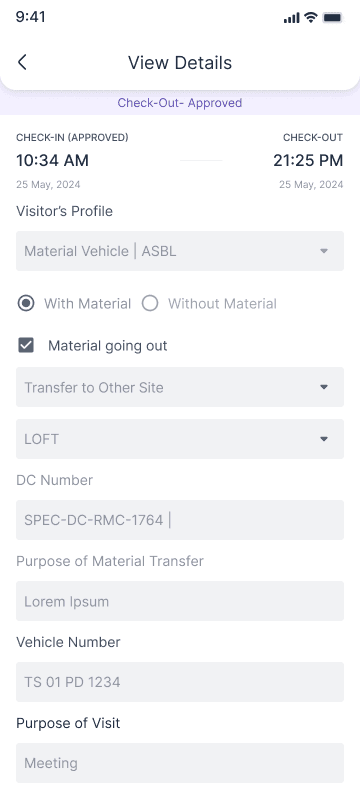
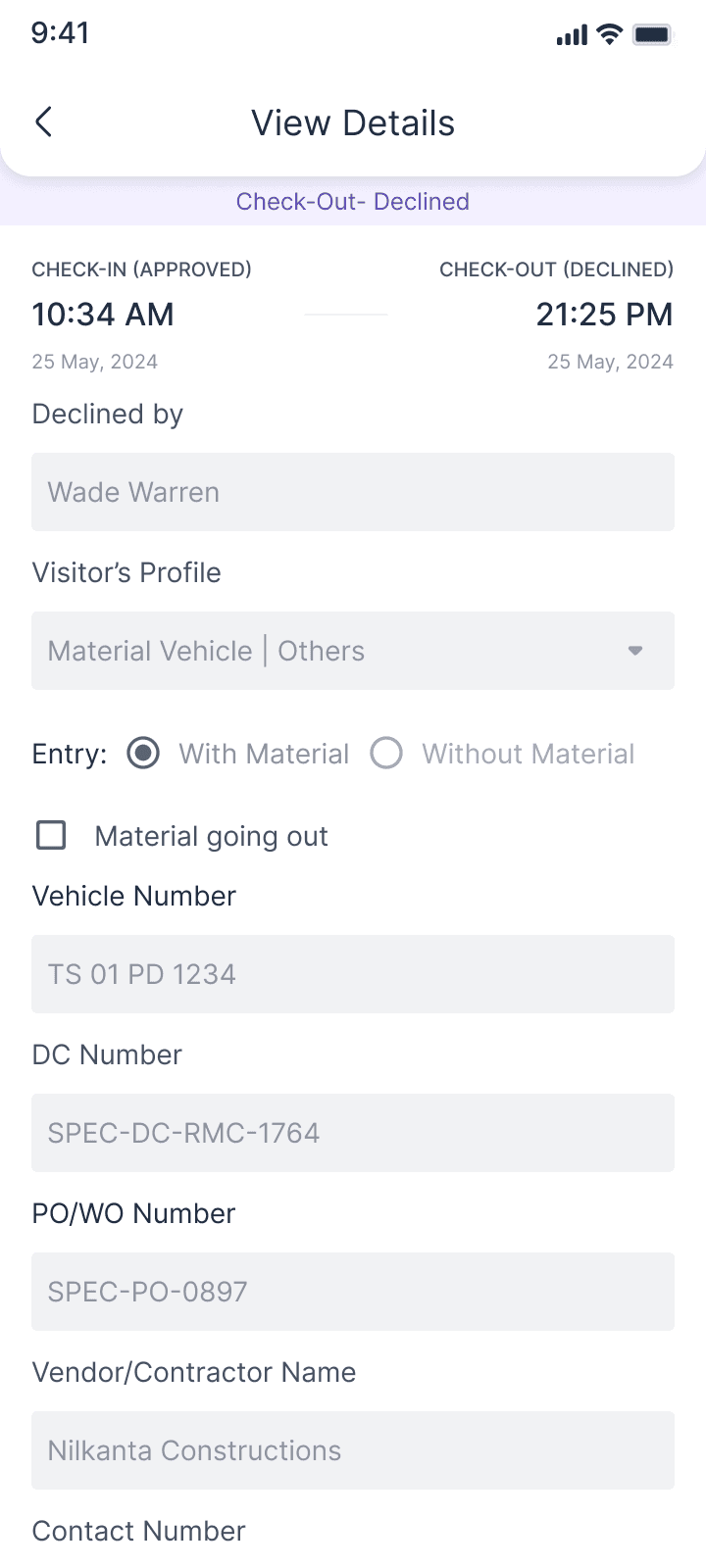
Material Vehicle Flow (PO/WO + MRN Logic)
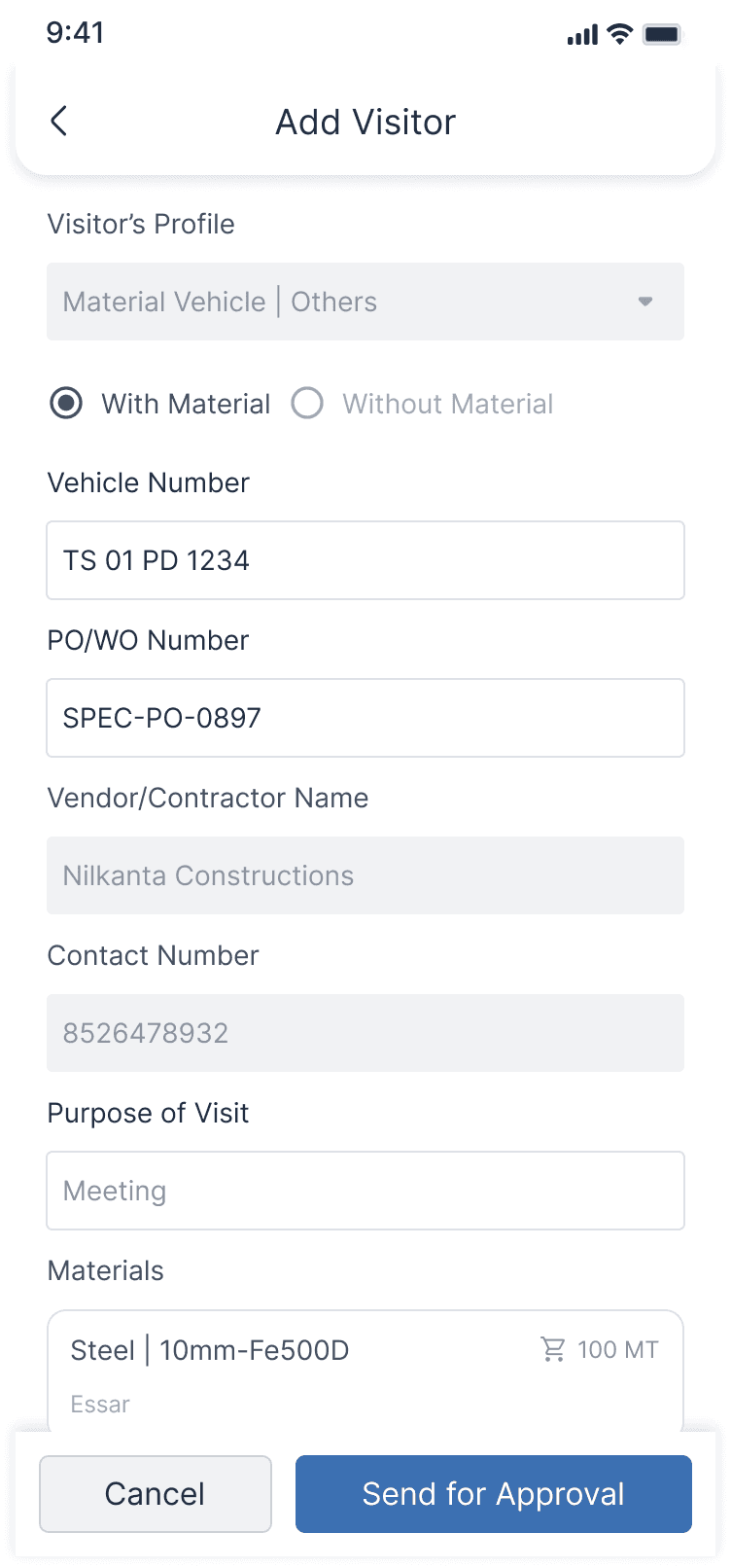
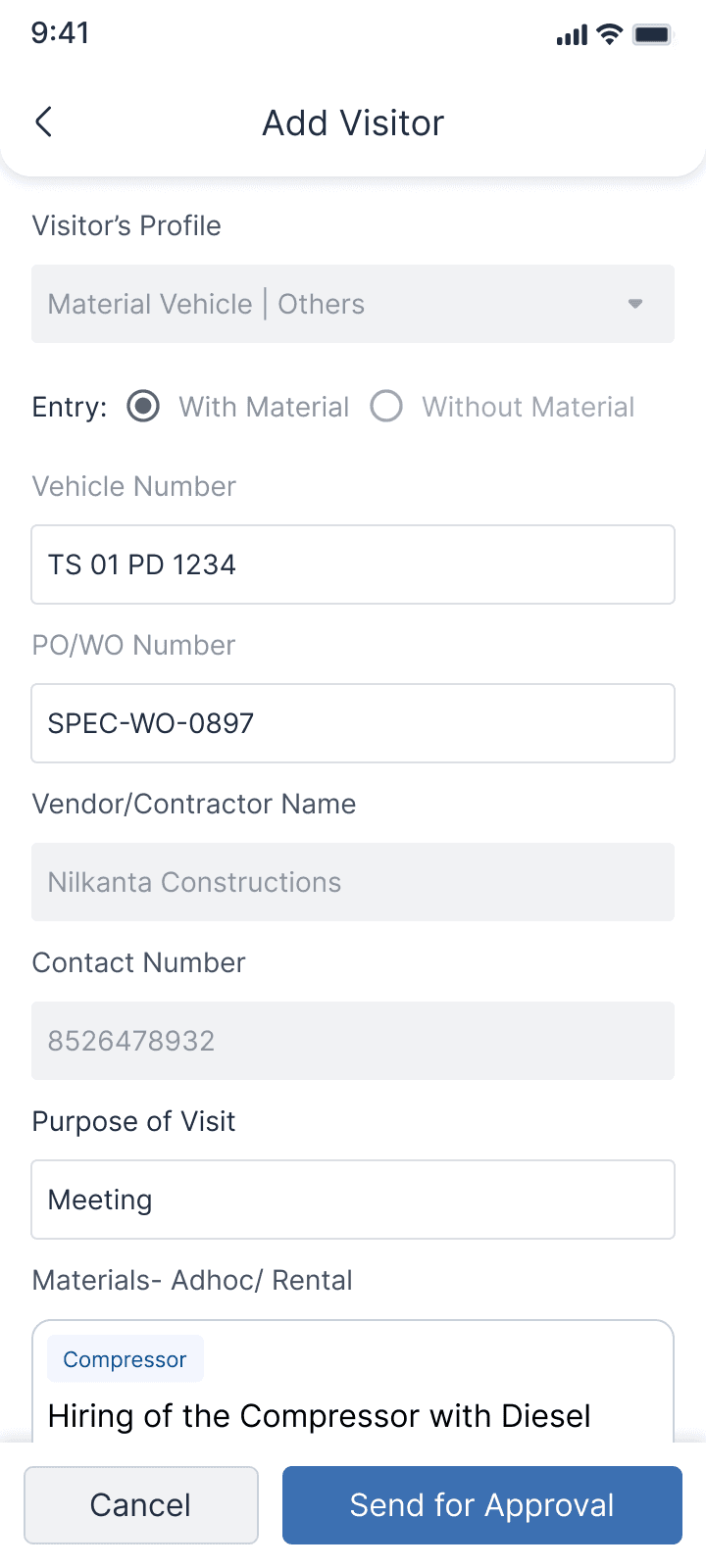
Material vehicles were the biggest bottleneck before, so this flow is strict but meaningful.
The system supports:
Vehicle entry with material linked to PO/WO
Vehicle entry without material (for other purposes)
Vendor and PO validation before entry
Handling of active vs inactive POs
Linking MRN (material receipt) where required
Blocking edits or deletions once material entry is logged
This connects visitor entry to inventory reality, instead of treating them as separate worlds.
Contractor Entry Flow
Adding Visitors & Aduit Logs
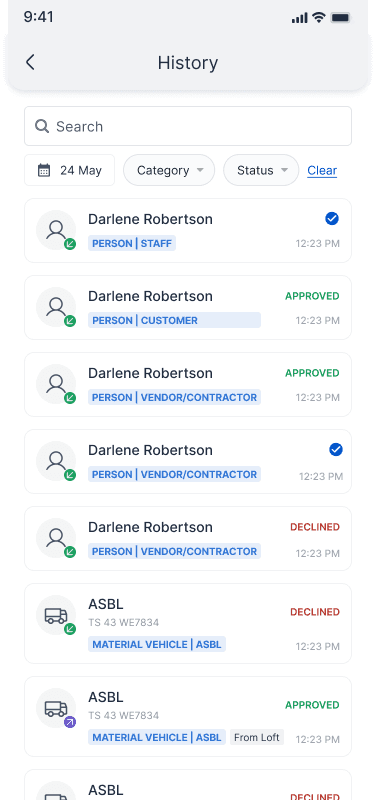
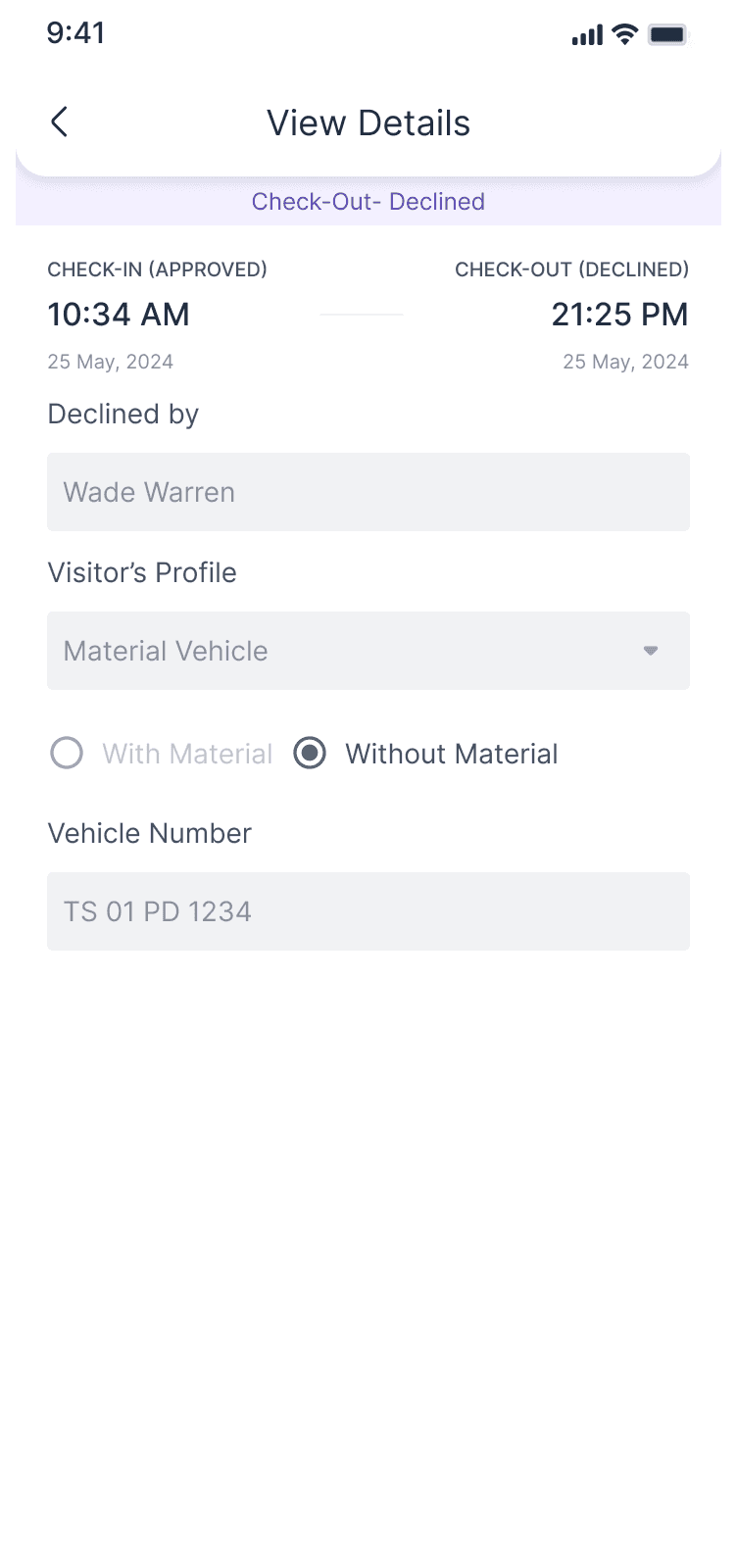
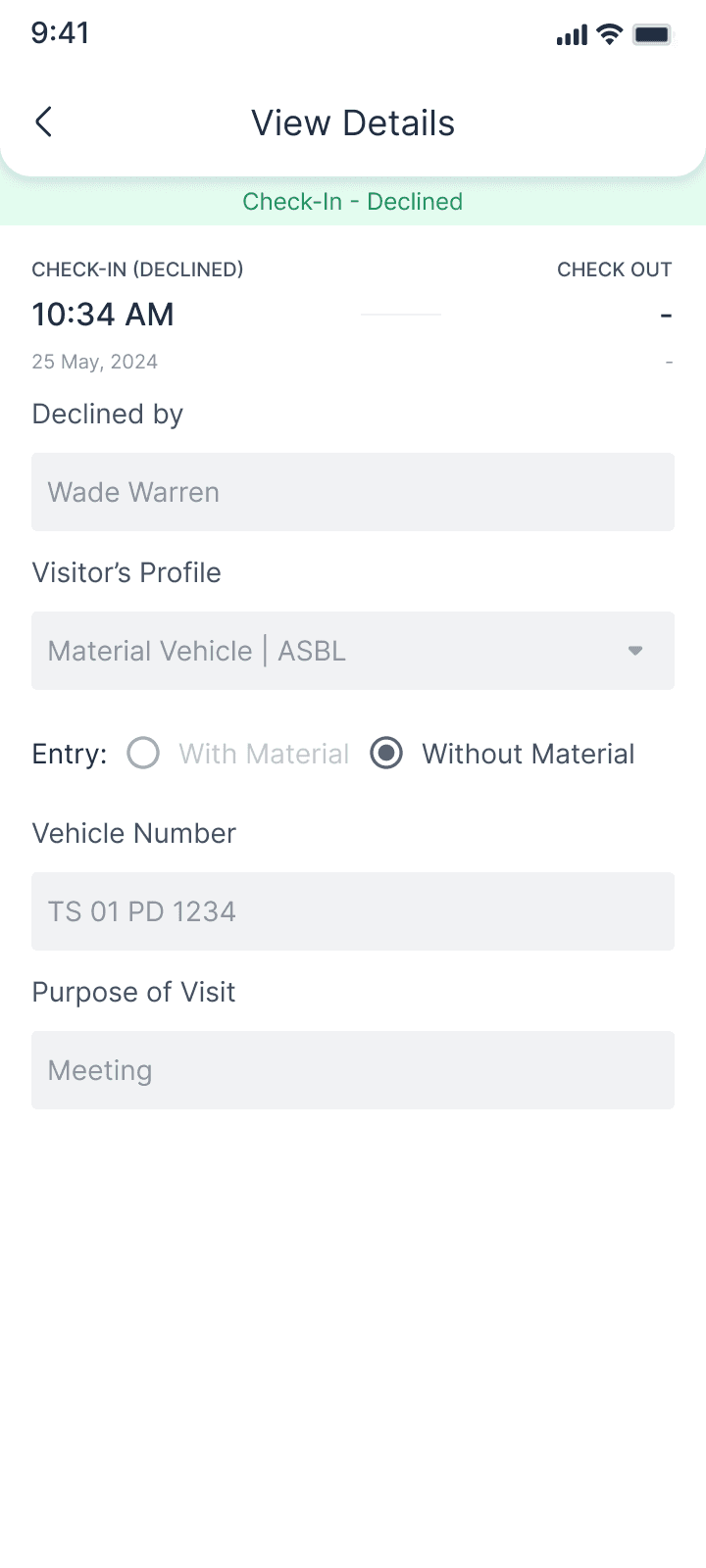
History & Audit Trail
Every movement is logged with:
Visitor type
Contractor or staff details
Vehicle and PO/WO info (if applicable)
Timestamps for request, approval, check-in, and check-out
Current status (completed, pending, etc.)
The history view is not for speed, it’s for trust, compliance, and resolving questions like “who was on-site yesterday afternoon?”
Audit Logs
Tracking every movement
Notifications & Approvals
To remove dependency on calls, the system sends:
Request notifications: to admins when a new visitor or vehicle needs approval
Approval/decline updates: to security so they know what to do
Check-in/check-out updates: where relevant
Admins see all the context they need; visitor type, contractor, labour count, PO/WO, purpose and can approve or decline directly from the system.
Notifications
Request, Approve/Reject Update & Check-in & Check-Out
How It Changed Daily Operations
Security now starts their day in the Visitor Tracker instead of in the call log.
Admins approve based on structured information, not vague requests.
Contractor labour counts feel controlled instead of approximate.
Material trucks move more predictably through the gate because PO/WO issues are caught early.
Daily visitor summaries are easier to pull because the history is already there.
Week 1 & 2
After launch, the gate workflow became noticeably smoother. Security finally had real-time visibility instead of relying on calls, admins approved faster with the right context, and contractor and material vehicle entries moved without the usual delays. What used to feel uncertain quickly became a predictable, controlled daily flow.
Clear visibility. Faster approvals. Smoother movement across the gate.
What I Learned And What Comes Next
Building this 0→1 system taught me a few things:
Security is the primary user, if they’re confused, the flow will break.
Approvals need clear context more than they need extra steps.
Material vehicle logic is as much about inventory as it is about visitors.
These systems reset mentally every day, the UX has to support that rhythm.
Good visibility removes half the friction by itself.
Next steps on the roadmap:
Add SLA timers to measure and improve approval response time
Introduce QR-based visitor and contractor passes for frequent entries
Add analytics around contractor labour patterns and vehicle frequency
Instrument telemetry to see where users slow down or drop off in the flow
Explore tighter integration with inventory and billing for material-linked entries
Thanks for your attention.
Let's talk
abhinav.design17@gmail.com
ABHiNAV
SiNGH

ASBL Progress
Jan – Aug 2025
Web + Mobile · Operations
Lead Designer
Visitor management : replacing gate chaos with structured, real-time entry
My Role
Lead Product Designer
Team
1 Designers · 1 PM · 2 APM · 20 Dev
Timeline
8 months
Platform
Web & Mobile
A 0→1 system that replaced phone calls, paper logs, and gate-level guesswork with real-time entry control across construction sites.
Context
Guesswork, delays, and too many assumptions at the site gate
Security depended on calls, admins relied on memory, and material trucks got stuck at the gate over PO mismatches, with no audit trail, no real-time visibility, and no system anyone could rely on.
Goal
Replace gate-level guesswork with real-time visibility, structured approvals, and an automatic audit trail
Approach
Started with how people actually handled entry today; the register, the calls, the PO printouts before touching screens
Understanding the user
We have four users

Security Guards
At project sites
Handling check-ins, check-outs, and basic validations at the gate. Their job is to make the right call, fast, on every person and vehicle that arrives.
What wasn't working
Handling check-ins, check-outs, and basic validations at the gate.
Their job is to make the right call, fast, on every person and vehicle that arrives.

Admins / Project Coordinators
ASBL Head-Office
Approving visitors, contractors, and vehicles, while managing project-level configurations and keeping labour counts accurate.
What wasn't working
Admins approved people without full context, leading to inconsistent labour counts and no simple way to track contractor presence on-site.

Project Managers
ASBL Head-Office
Wanting visibility into who is on-site and how material is moving, without having to chase security or admins for updates.
What wasn't working
Material vehicles frequently got stuck due to PO/WO mismatches or unclear MRN requirements. No structured, audit-ready log of who entered or which vehicle brought what.

Contractors, Vendors & Drivers
At project sites
Needing predictable entry without unnecessary delays, whether it's a labour team arriving for work or a material truck with a delivery.
What wasn't working
No predictability at the gate. Trucks waited because PO issues were discovered on arrival. Labour counts were questioned without any ground truth.
Problem statement
Four compounding problems
No single part was catastrophically broken. Together, they created a system where uncertainty was the default and every gate interaction required improvisation.
Problem 01
No real-time fund visibility
Security had no live view of who was approved, who was inside, or who had checked out. Every entry decision required a call or a guess.
Problem 02
Approvals without context
Admins approved people and vehicles without full context, contractor name, labour count, PO number, purpose. Decisions were inconsistent with no accountability trail.
Problem 03
Material vehicles stuck at the gate
PO/WO mismatches and missing MRN requirements stopped trucks at the gate. No upfront validation, vehicles only discovered problems when they arrived.
Problem 03
No audit trail
No structured log of who entered, when they checked out, or which vehicle brought what. End-of-day reports had to be extracted manually from calls and gate notes.
Approach
Three hypotheses
1
Live status removes the need for calls
If security and admins can see live visitor statuses, approvals don't depend on phone calls.
2
Category-based rules reduce improvisation
If staff, contractors, and vehicles have tailored flows, security doesn't have to improvise each time.
3
Every log reduces disputes
If every check-in and check-out is logged automatically, no one has to guess who was inside or when.
Key decisions


Question
Should all visitor types share one flow?
Decision
No. Staff ≠ Contractor ≠ Material Vehicle. Each gets a tailored flow. The system adapts, not security.
Question
When should staff approvals be required?
Decision
Never for known employees. Staff auto-approve based on project rules, no daily queue at the gate.
Question
When should PO/WO validation happen?
Decision
At entry, not before. Validate PO status the moment a vehicle is logged, catch issues before the truck pulls through.
Question
Who is the primary user?
Decision
Security. If they're confused, the flow breaks. The Visitor Tracker was designed around their mental model first.
Before → After
What changed at every stage of entry
The old flow wasn't broken in one place, it was broken at every stage simultaneously. Here's what the new system replaced, step by step.

Solution
The system, by component
We built a proper system around how site entry actually works, category-first, real-time, and audit-ready from day one.
Core
Real-time Visitor Tracker - web + mobile
The first screen security opens every morning replacing the call log. A live view of all today's movements across tabs: Requested, Check-In, Check-Out.
Live count of total visitors and vehicles on site
Tabs for Requested, Checked In, Checked Out
Filter by visitor type, search by name or vehicle number
Security sees updated status instantly, no call needed
Staff
Staff entry - frictionless by design
Known employees shouldn't create a queue at the gate every day. Staff entries are auto-approved and traceable.
Selected from the central employee directory, no manual typing
Auto-approved based on project rules
Multiple staff added in a single action
Check-in and check-out are fast and logged automatically
Contractor
Contractor entry - labour counts and approvals
One clear question at the gate: "Does this contractor have approval, and how many people from them should be inside right now?"
Contractor selected from global contractor directory
Expected labour count entered upfront
System shows how many from same contractor are already inside
Day-level or permanent approvals for regular contractors
Declined state shows reason and who declined
Material Vehicle
Material vehicles - PO/WO + MRN logic
Material vehicles were the biggest bottleneck. The flow connects visitor entry to inventory reality, catching issues before the truck pulls through the gate.
Entry with material linked to PO/WO, or without material for other purposes
PO validation and MRN requirement surfaced at log time
Active vs inactive PO handled, no surprises at the gate
Edits and deletions blocked once material entry is logged
Audit
History & audit trail - not for speed, for trust
The history view answers questions nobody could answer before: "Who was on-site yesterday afternoon?" Every movement logged automatically, not manually.
Visitor type, contractor details, vehicle and PO/WO info
Timestamps for request, approval, check-in, and check-out
Status per entry: completed, pending, declined
Searchable and filterable by date, category, and status
Notifications
Notifications - removing the dependency on calls
Admins get all context they need in the notification itself, visitor type, contractor, labour count, PO/WO and approve or decline directly from it.
Request notifications to admins when approval is needed
Approval/decline status pushed to security instantly
Check-in and check-out updates where relevant
Impact — Week 1 & 2 post-launch
"Clear visibility. Faster
approvals. Smoother
movement across the gate."
1
Security starts their day in the Visitor Tracker not in the call log
2
Admins approve based on structured information, not vague requests
3
Contractor labour counts are controlled, not approximate
4
Material trucks move predictably, PO/WO issues caught before arrival, not at the gate
5
Daily visitor summaries pulled in seconds — the history is already there
What comes next
SLA timers, QR-based passes, Labour analytics, Telemetry & Inventory integration.
Let's talk
abhinav.design17@gmail.com
ABHiNAV
SiNGH