Payout Management
Predictable payouts for busy Finance teams
Teams
2 Designer, 1 PM, 2 APM, & 7 DEv
Jan - aug 2025
Asbl, Finance
WEB · FINANCE · CONSTRUCTION · 10–15 MIN READ
A New Way to Handle Payouts: Verification First, Errors Last
Finance teams were drowning in spreadsheets, manual verification, and delayed vendor payouts. Causing unhappy vendors, slow project progress, and risk to cash-flow forecasting.
The Payout Management module centralised payments, enforced verification, and introduced category-level budget mapping to restore trust and speed.
Building Context
guesswork, delays, and too many assumptions
Our payout system looked structured from the outside, but inside it was slow, unclear, and risky. Teams were approving payments without real-time balances, vendor checks were manual, and one wrong detail could trigger days of rework. Approvals dragged, OTP flows broke, and nobody could confidently link payouts to actual budgets. Money moved but visibility didn’t.
Understanding the Goal
Risk Reduction, Operational Efficiency and Financial Governance
Fix the chaos. Build a payout flow that’s fast, verified, and predictable. Give teams real-time balances, clean approval paths, and payouts that only move when every detail is verified. Make budgets and disbursements speak the same language so finance, managers, and vendors finally trust the system.
High-level impact
first 2 weeks post-launch
Once the new payout system went live, the impact was visible almost immediately. The day-to-day friction that teams were so used to suddenly wasn’t there anymore and that alone changed how fast everything moved.
Payouts started moving quicker because the flow finally made sense. Teams didn’t have to chase balances, verify vendors manually, or wait on calls for approvals. With real-time numbers, proper verification, and a clear approval path, payout initiation became noticeably faster within just a couple of weeks.
Finance didn’t have to spend hours fixing errors or reconciling mismatched entries, the system handled most of it cleanly. And because every vendor and account had to be verified upfront, payment failures practically disappeared. What used to feel messy and uncertain became straightforward, predictable, and easy for everyone involved.
The Problem, Through My Lens
The first thing I noticed about our payout system wasn’t the UI, it was the silence. No alerts. No real-Time checks. No clear signal of what was happening with the money. Just teams guessing balances, calling for approvals, and hoping vendor details were right.
One wrong payout could stall a project, but the system wouldn’t warn you. That tension, that “anything can go wrong at any step” feeling; is exactly why this redesign needed to happen.
Opaque Fund Movement
Problem Area #1
Department heads were always asking, “Do we actually have that money?” But balances were buried, and there was no real-time view on cash flow across projects.
Risky Vendor Disbursements
Problem Area #2
Payments went out without rigorous checks, and that worried me. I kept thinking: “What if we pay the wrong account?”
Slow, Manual Processes
Problem Area #3
Sweeps, approvals, OTP verifications — it all felt brittle. Every extra click, every manual step, was a potential bottleneck.
No Budget Clarity
Problem Area #4
While leaders had high-level budgets, they couldn’t see outflows mapped to why they were spending (which category, which month), so planning was difficult.
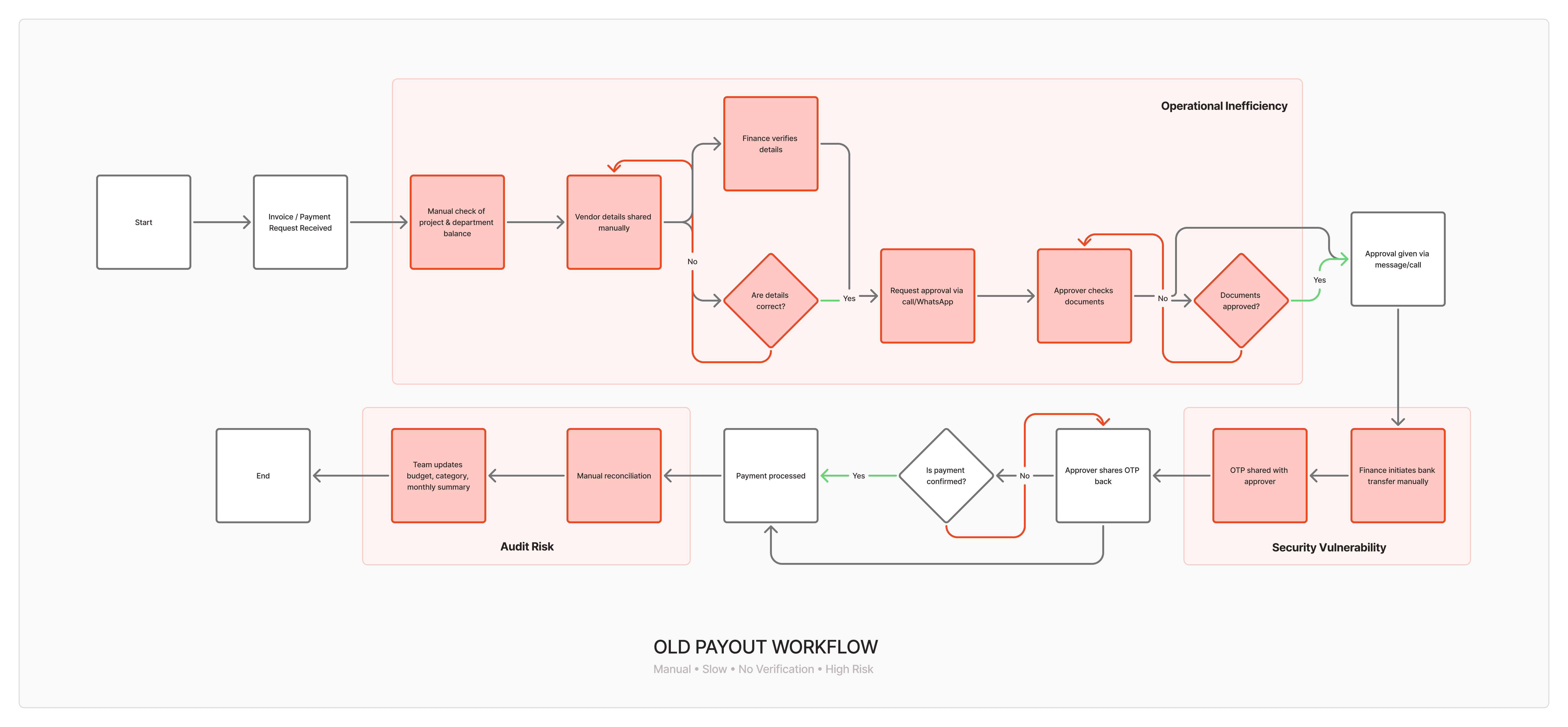
“I’m double-checking balances across multiple sheets… I wish the system just showed the real numbers. What if a vendor detail is wrong, the whole payout gets stuck and we spend days fixing it.”
-Finance Employee
“I don’t know how much of my category budget is already consumed. What if I’m not available for a call, everything gets delayed.”
-Project Managers & Department Heads
“I get requests on WhatsApp, email, SMS but none of it shows the full picture. The system doesn’t tell me if a payout fits into the budget or not.”
-Admin
“When payouts get delayed, our entire work schedule gets affected. If my account details are wrong, nobody notices until the money fails.”
-Vendors / Contractors
What I Aimed to Solve,
My Hypotheses
Since this was a 0→1 build, the insights we gathered from finance teams, managers, and on-ground operations became the starting point, not the correction step. I mapped their day-to-day payout workarounds, the calls, the spreadsheets, the manual checks, to understand where friction naturally happened and why.
The goal wasn’t to tweak an existing flow but to design a system that removed these bottlenecks from the very beginning. These observations became the backbone of the hypotheses that shaped how the payout experience should work: clear, verified, and predictable right from day one.
Reduces payment failures
Hypothesis #1
If we enforce vendor verification (PAN/GST/bank), transfer failures will fall, and trust will rise.
Speed up processing
Hypothesis #2
If we let people cluster multiple invoices into a batch (“cluster payments”), the initiation flow will be faster and less error-prone.
reduce manual corrections
Hypothesis #3
If every payout step has strong confirmation and audit trail, we reduce risk and improve accountability.
better Ownership & control
Hypothesis #4
If department heads can map budgets by category + month, they’ll feel more ownership and control over spending.
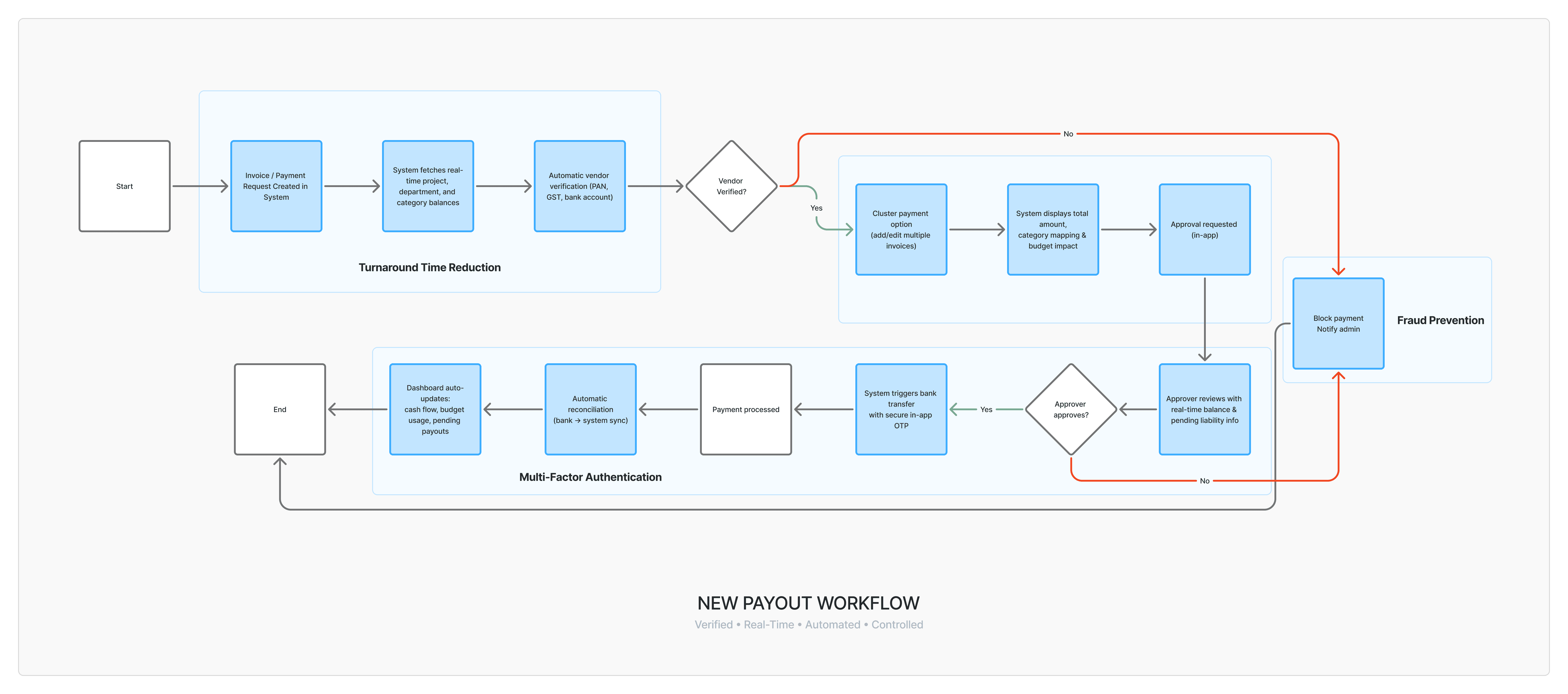
What We Built,
The Solution
Once we mapped the real-world pain points and shaped our initial hypotheses, the next step was turning them into a working system, not on paper, but in a way that teams could trust from day one.
Each hypothesis pushed us toward a specific design and product decision. Instead of over-engineering, we kept things practical and built features that directly fixed the gaps we saw.
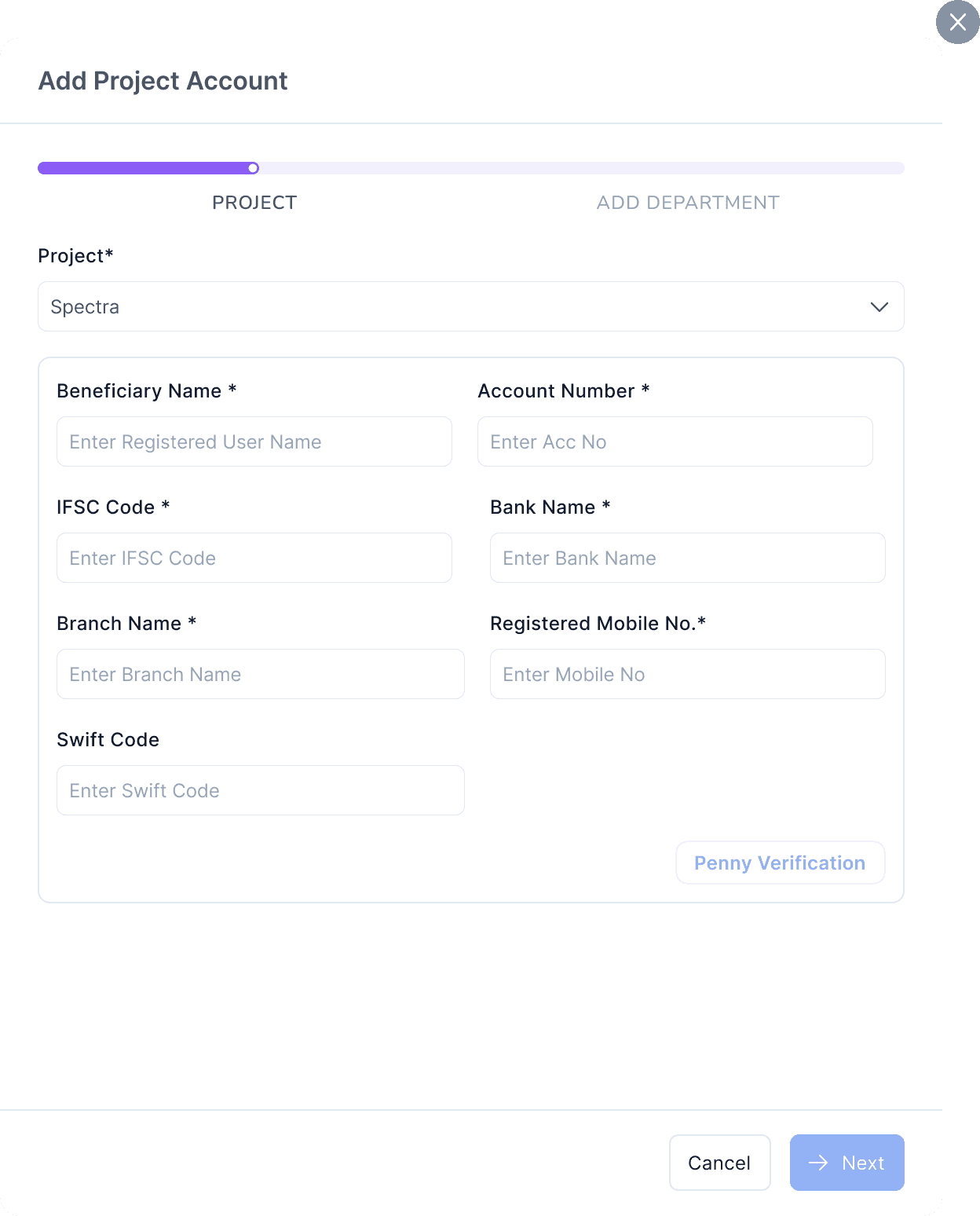
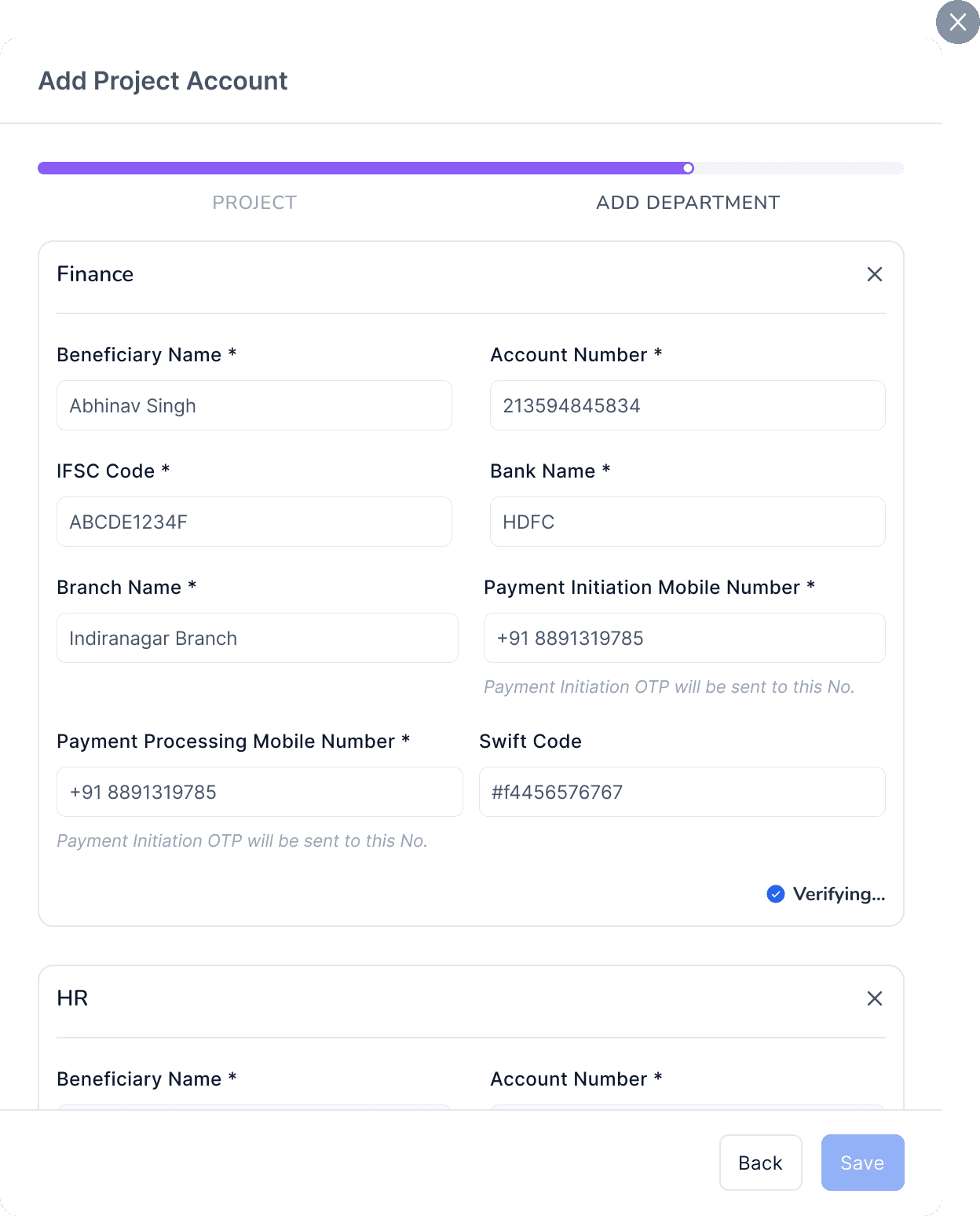
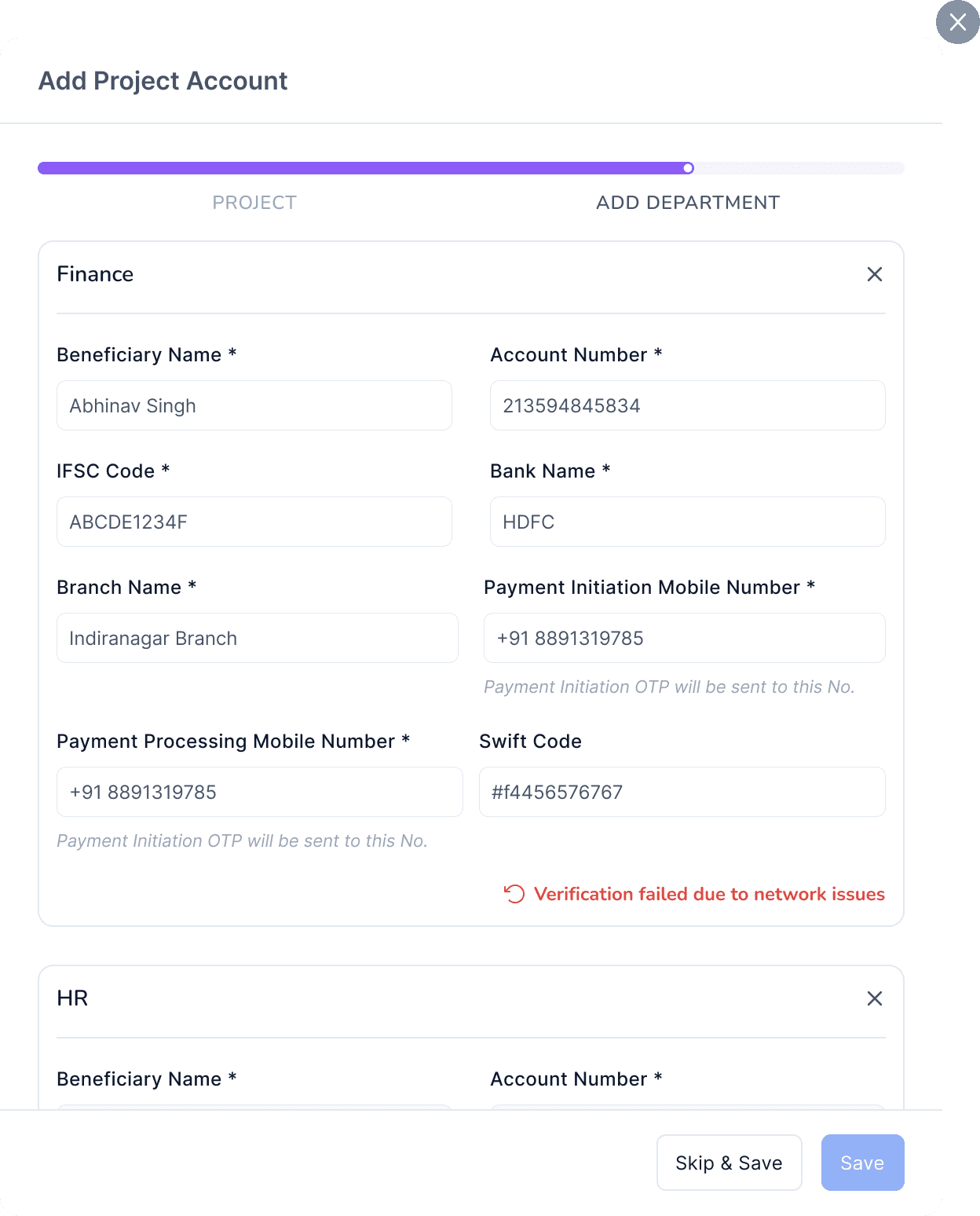
Account Configuration & Penny-Drop Verification
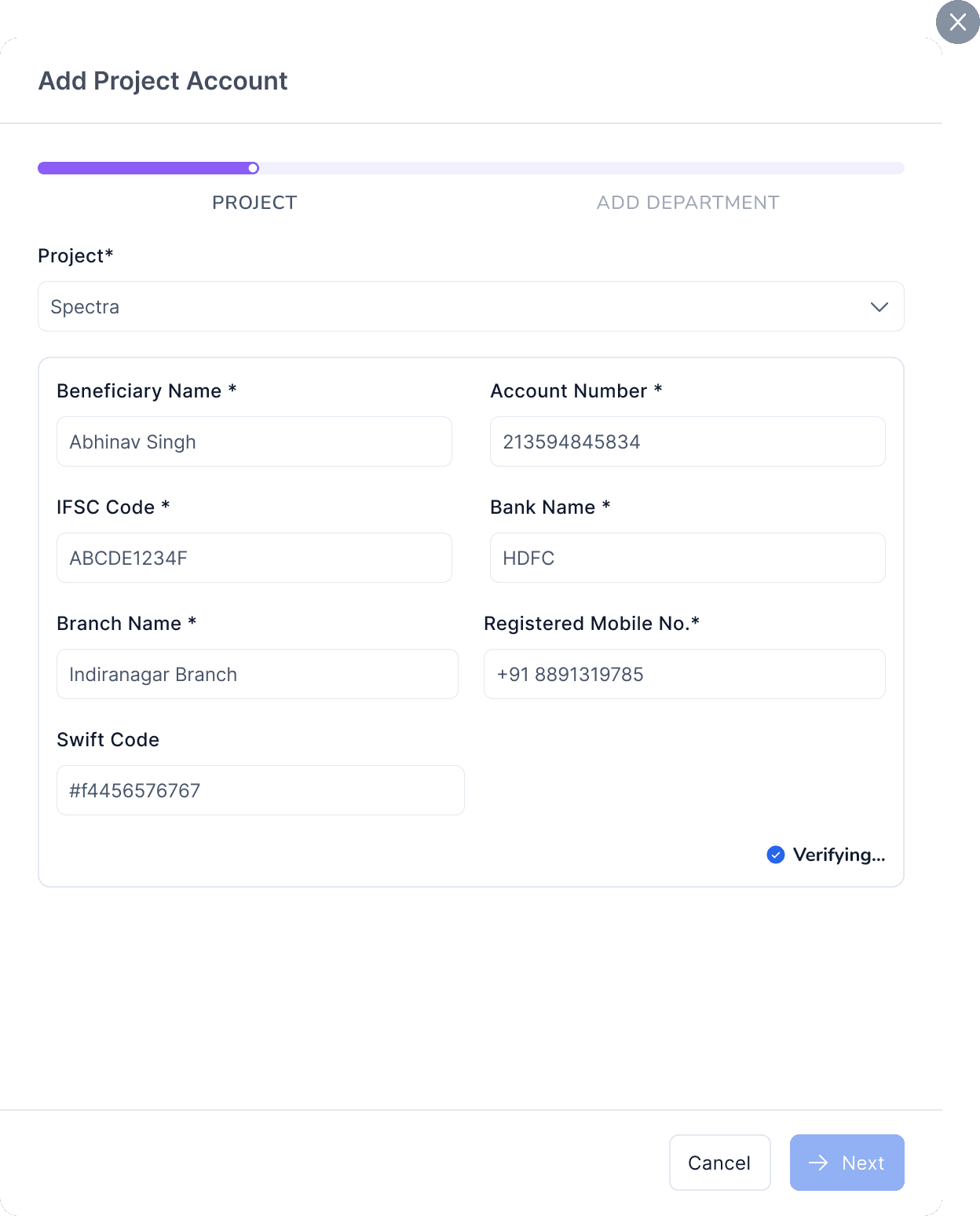
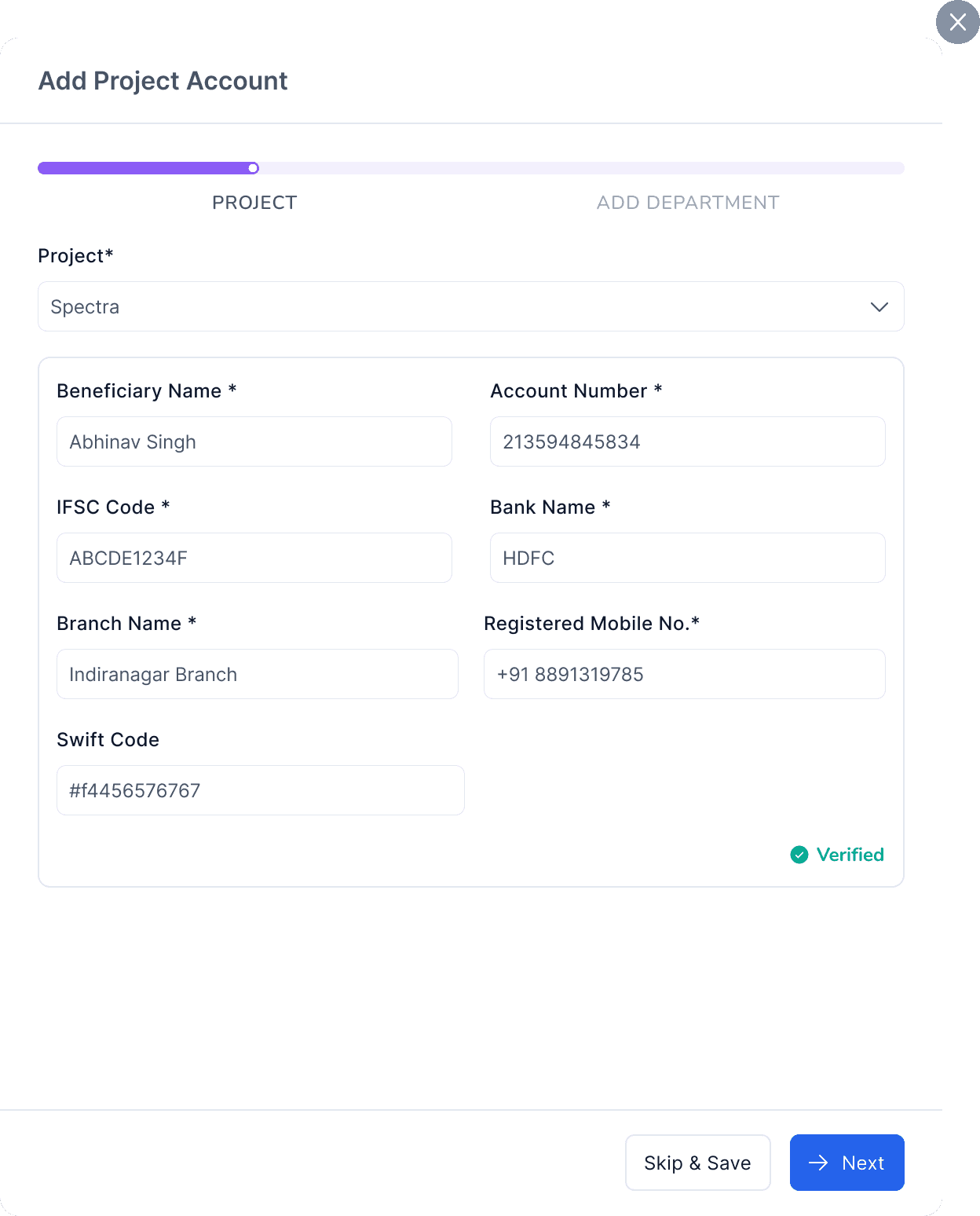
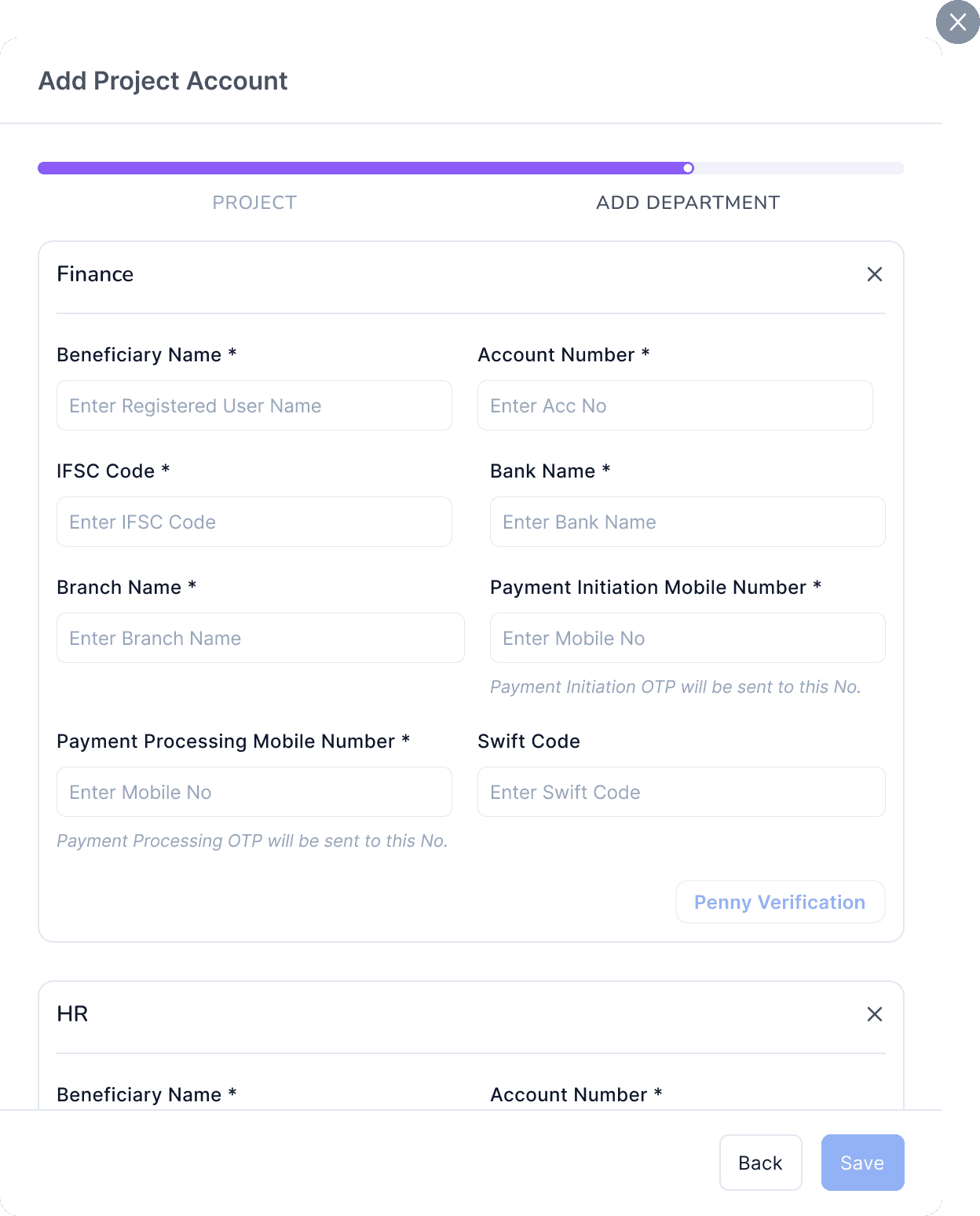
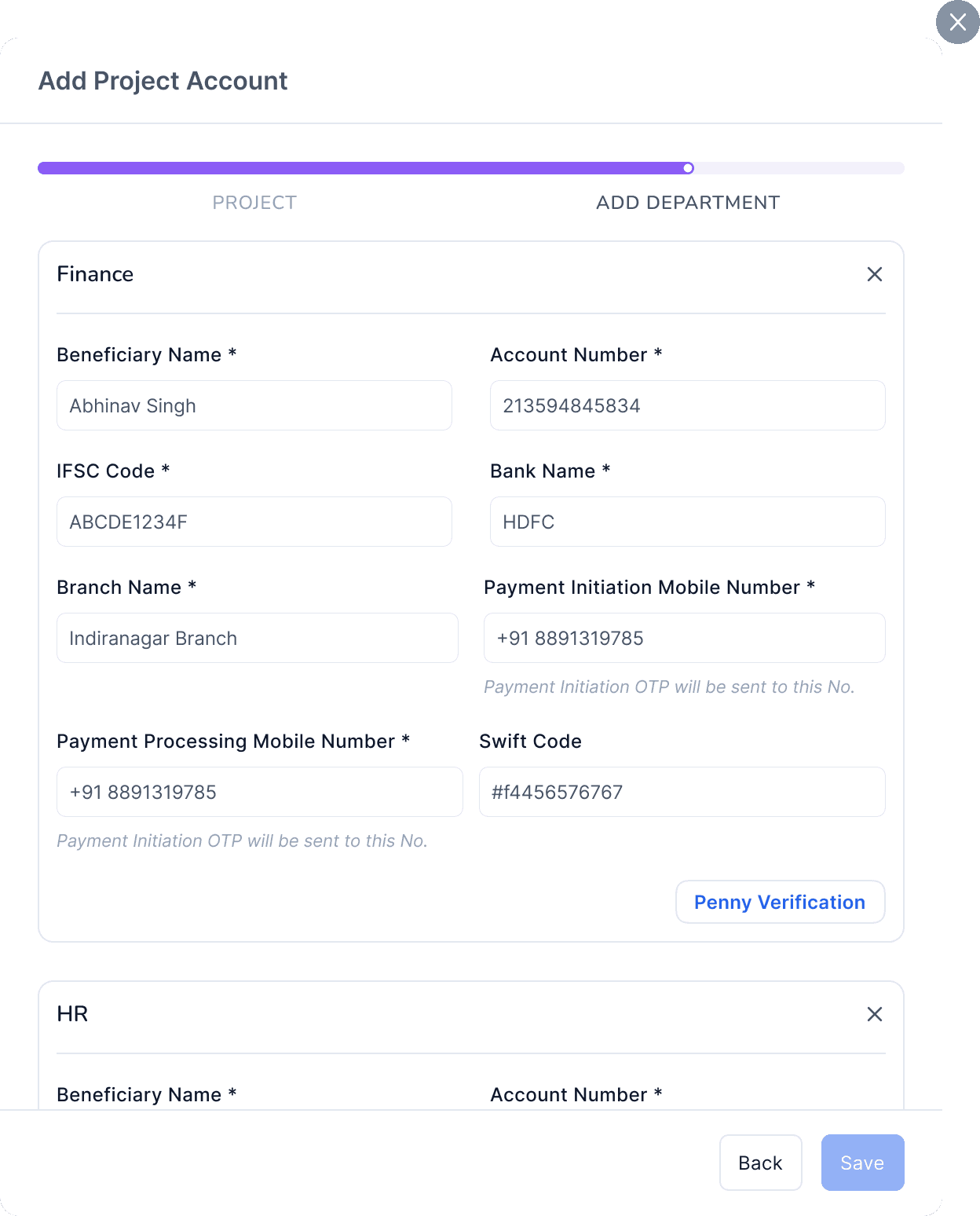
We started by securing the foundation: the accounts themselves. Every project and department account must now go through a penny-drop verification before it can be added or edited. No shortcuts, no assumptions. This removes the biggest silent risk, incorrect or outdated bank details entering the system.
By forcing verification upfront, we made sure the payout flow only operates on trusted, validated financial accounts. It’s a simple guardrail that prevents high-impact errors before they even reach the payout stage.
Account Verification - Project Level
Integrated Deepvue & HDFC Bank
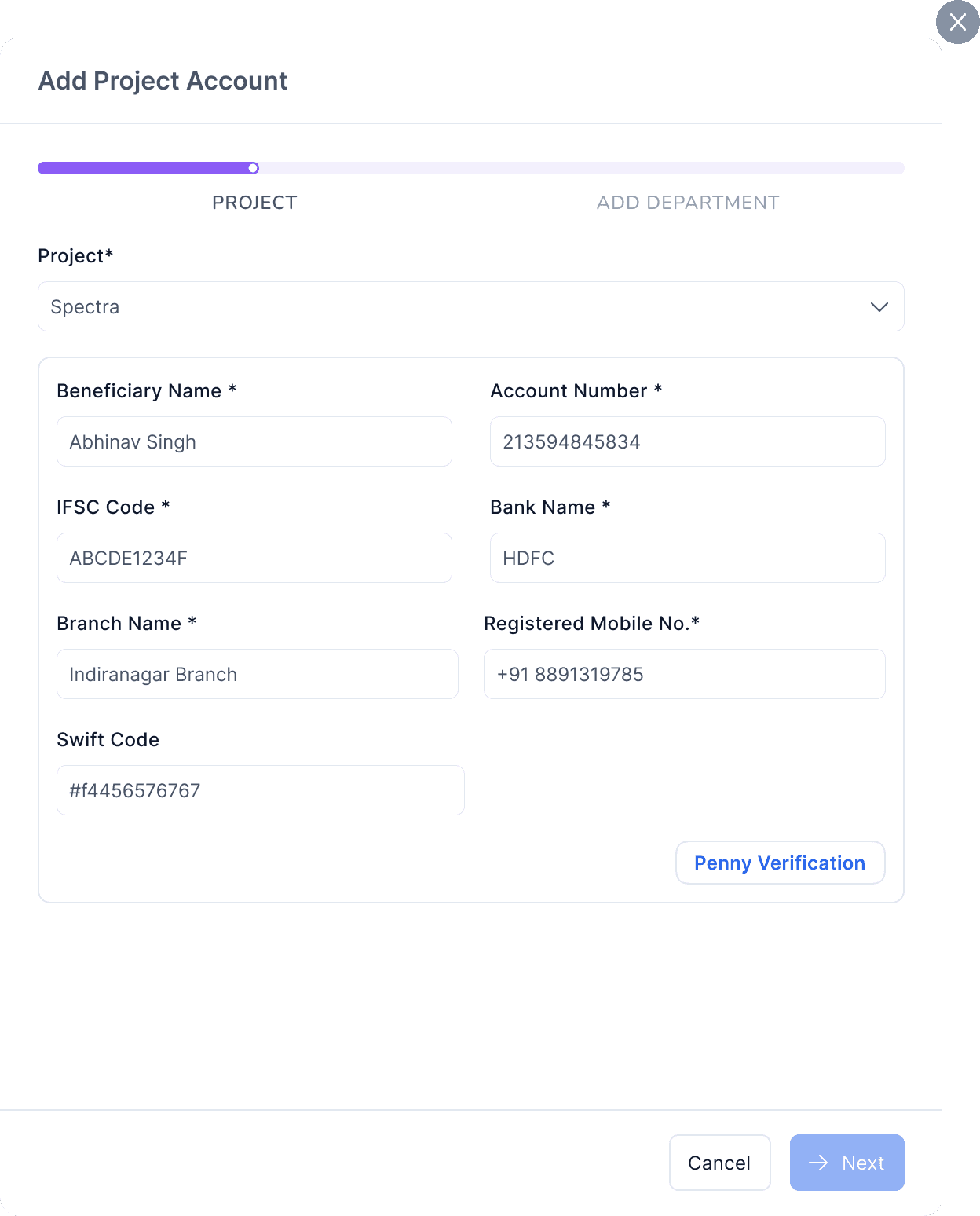
Account Verification - DEpartment Level
Integrated Deepvue & HDFC Bank
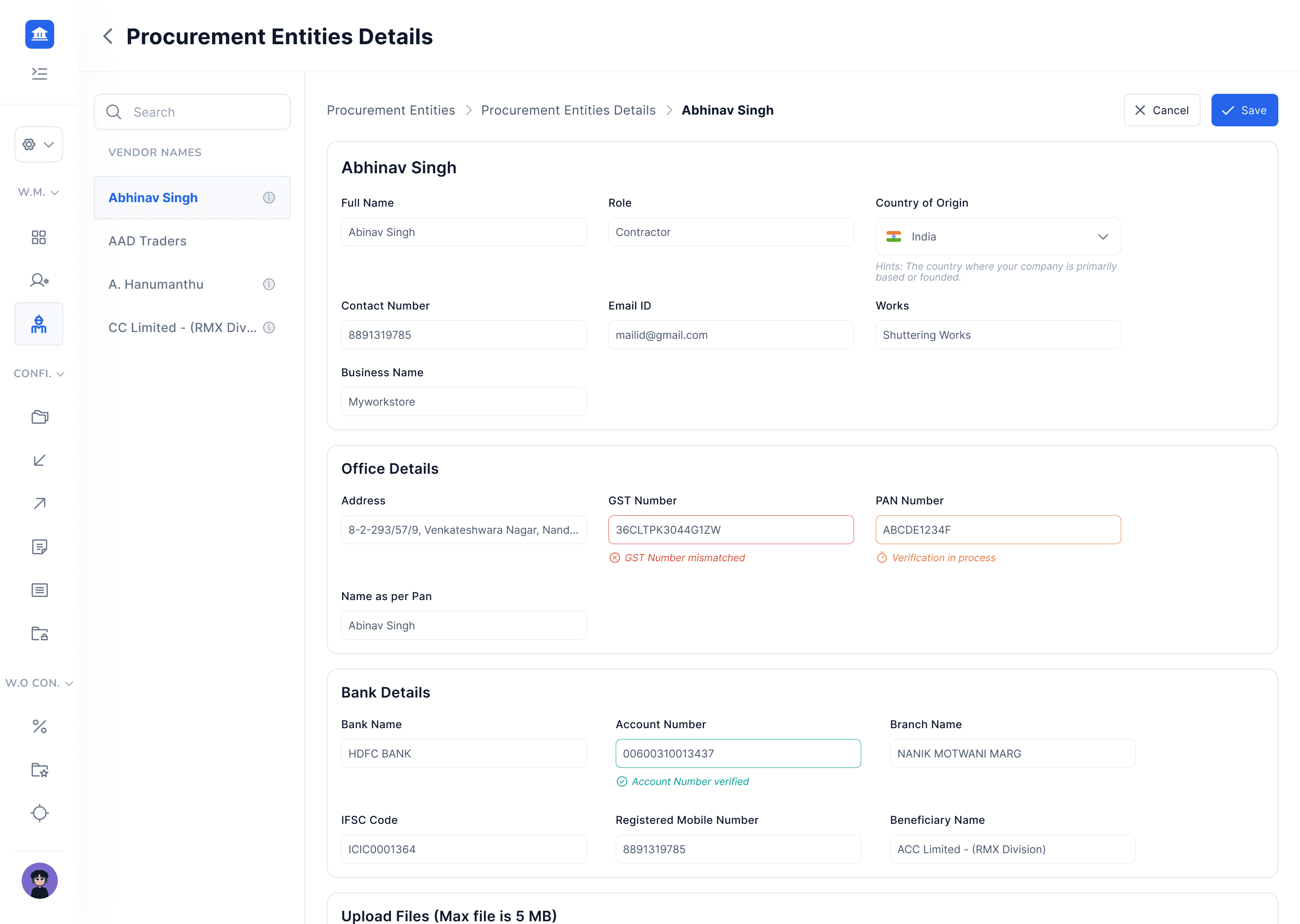
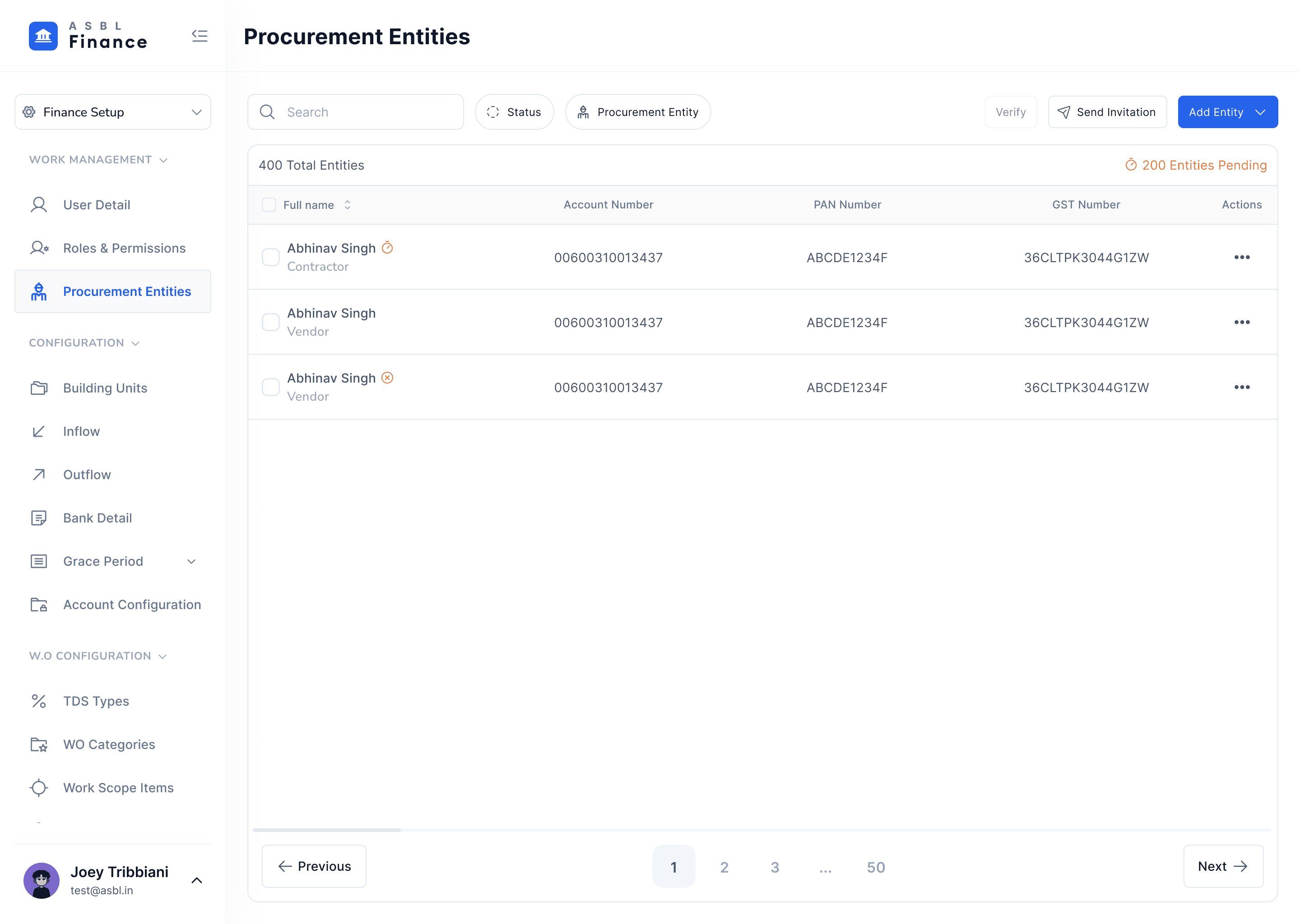
Vendor & Contractor Verification (KYC/KYB)
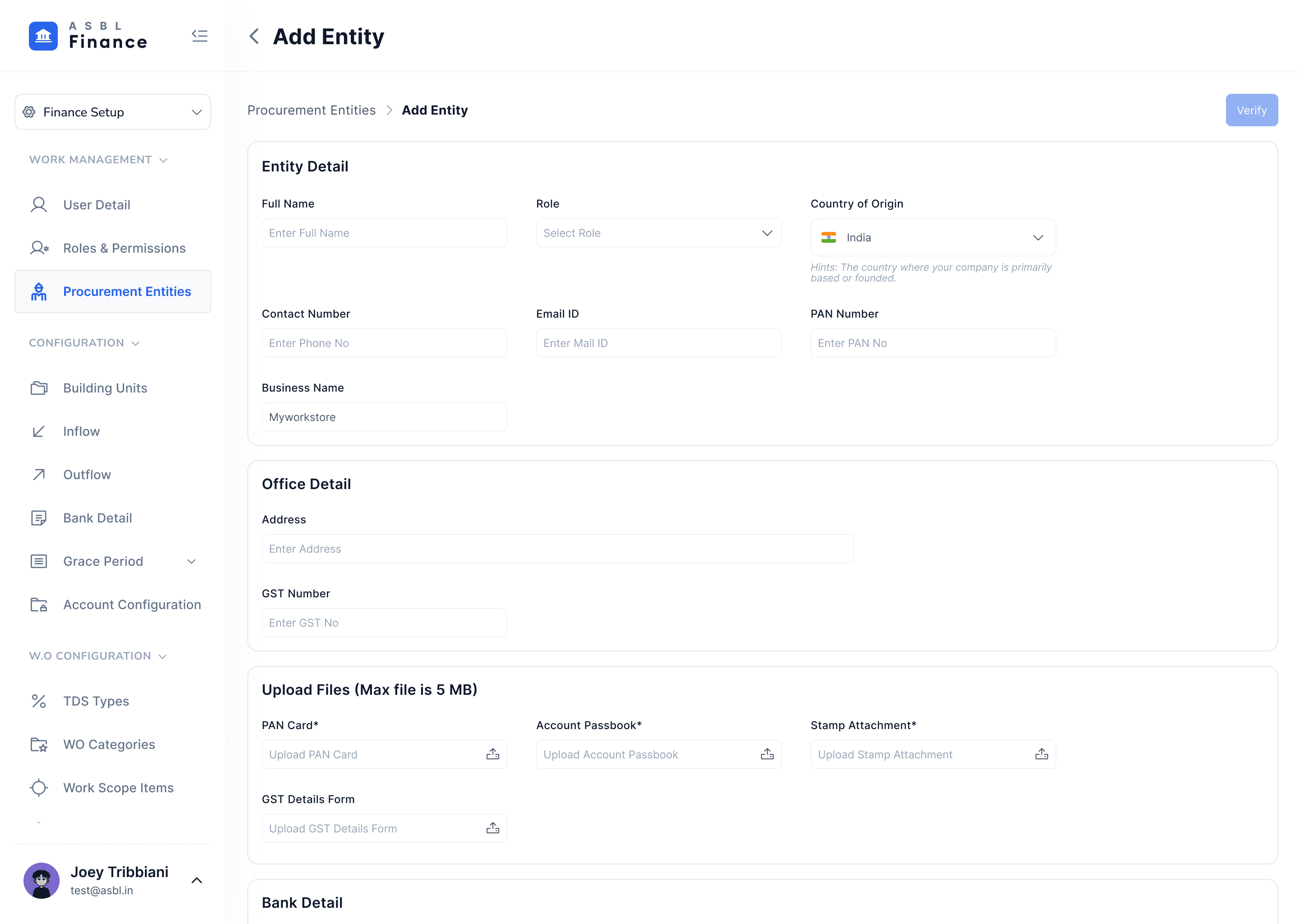
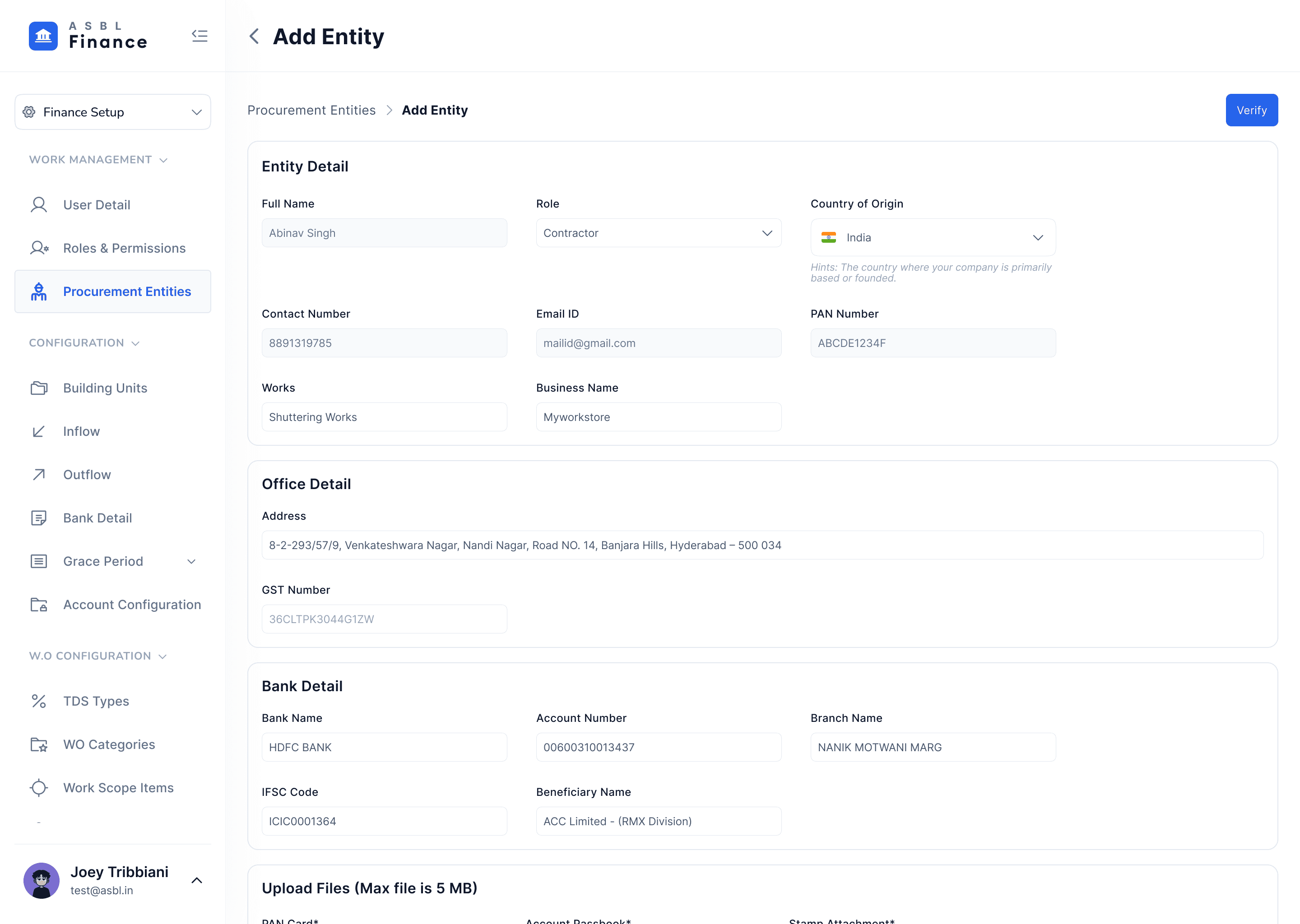
Next, we built a verification layer that checks every vendor and contractor using PAN, GST, and bank account validation. Instead of allowing payments to flow first and discovering problems later, the system now blocks disbursals until all verification checks pass. This closed the door on failed payouts, reversals, and manual rework.
Vendors with mismatched names, unverified accounts, or incomplete details can’t slip through anymore. For finance teams, this instantly removed the stress of “Did we pay the right person?” from their workflow.
Vendor / Contractor Verification
Integrated Deepvue & HDFC Bank
Speeding Up Approvals
Once the verification risks were handled, the next priority was speed. Approvals used to depend on calls, reminders, and scattered information. Now, approvers get a complete context snapshot, real-time balance, budget impact, category mapping, and vendor verification status all in one place.
Notifications are built into the system, and the approval path is structured and predictable. This shift cut down decision lag, reduced back-and-forth, and made approvals something users could complete confidently in seconds, not hours.
My Process & Mindset While Building This
I built this 0→1 system by staying close to the people who would use it every day, shadowing finance teams, digging through support tickets, and speaking directly with department heads to understand the real friction behind every workaround.
Instead of overthinking, we shipped a lean MVP, tested it quickly, and refined the flow based on what users actually struggled with. Throughout the process, I pushed for strong verification and safety controls without making the experience feel heavy or slow, finding the middle path between risk and usability.
I kept the entire journey transparent, documenting decisions, trade-offs, and even the problems we deliberately parked. That clarity helped engineering, finance, and leadership trust the process and move together.
Launch & Immediate impact
Week 1 & 2
Enabled verification gating and cluster payments. Result: 8x faster initiation flows for verified vendors; support tickets related to payment errors dropped by 60%.
Operational wins
Finance team reported 75% less time reconciling accounts and near-zero failed bank transfers due to verification.
Month 1
Vendors appreciated that they were being “checked,” and leadership liked the audit trail — the system felt more trustworthy. With budget visualization, department heads could see exactly how much they’d spent, with category-level insight.
What I Learned And What Comes Next
Building this 0→1 payout system taught me that strong logic isn’t enough, we need visibility into how people actually move through the flow. Adding proper telemetry is my next priority so we can catch drop-offs the moment they happen.
I also realized how much user anxiety comes from unclear timelines, so better priming around verification stages is something I want to tighten.
On the interaction side, I plan to test different confirmation patterns for cluster payments to balance confidence and speed. Vendor checks shouldn’t be a one-time event either, so continuous monitoring sits high on the roadmap. And as the product grows, documenting our rules, edge cases, and escalation paths becomes essential, not just for internal clarity, but to keep the entire payout system consistent and secure as we scale.
Thanks for your attention.
Let's talk
abhinav.design17@gmail.com
ABHiNAV
SiNGH

ASBL Finance
Jan – Aug 2025
Web · Enterprise SaaS
Lead Designer
Payout Management : making complex financial workflows predictable
Finance teams were drowning in manual verification, scattered approvals, and failed bank transfers.
I redesigned the entire payout system 0→1 — from how accounts are verified to how money moves.
My Role
Lead Product Designer
Team
2 designers · 1 PM · 2 APM · 7 Dev
Timeline
8 months
Platform
Web (B2B SaaS)
ASBL Finance
Jan – Aug 2025
Web · Enterprise SaaS
Lead Designer
Payout Management : making complex financial workflows predictable
Finance teams were drowning in manual verification, scattered approvals, and failed bank transfers.
I redesigned the entire payout system 0→1 — from how accounts are verified to how money moves.
My Role
Lead Product Designer
Team
2 designers · 1 PM · 2 APM · 7 Dev
Timeline
8 months
Platform
Web (B2B SaaS)
The Problem
Guesswork, delays, and too many assumptions
Finance teams were approving payments without real-time balances, checking vendor details manually, and chasing approvals over WhatsApp and phone calls. One wrong detail could stall a project for days.
Problem area 01
Opaque Fund Movement
No real-time cash view. Balances were buried in spreadsheets teams made decisions on stale data.
Problem area 02
Risky Disbursements
Vendor details assumed, not verified. Wrong accounts triggered reversals nobody caught until days later.
Problem area 03
Slow Manual Approvals
Every approval was a phone call. OTPs shared informally. Any one step could block the entire flow.
Problem area 04
No Budget Clarity
Leaders couldn't see spend by category or month. Planning was guesswork. Reconciliation was a monthly ordeal.
What users said

Priya R.
Finance Executive
"I'm double-checking balances across multiple sheets. What if a vendor detail is wrong, the whole payout gets stuck and we spend days fixing it."

Aman K.
Project Manager
"I don't know how much of my category budget is consumed. If I'm not available for a call, everything just… stops."

Sneha M.
Admin
"I get requests on WhatsApp, email, SMS none of it shows the full picture. The system doesn't tell me if a payout fits the budget."

Ramesh
Vendor / Contractor
"When payouts get delayed, our entire schedule is affected. If account details are wrong, nobody notices until the money fails."
Ideation
Hypotheses That Drove Design
0→1 build. Started with field research, shadowing finance teams, mapping workarounds, reviewing support tickets. Four hypotheses shaped every decision.
Reduce Failures
Enforce vendor verification
PAN / GST / bank verification before any payout. If details don't pass, money doesn't move.
Speed Up Processing
Cluster multiple invoices
Batch multiple invoices in one initiation flow, fewer steps, fewer errors, faster turnaround.
Reduce Manual Corrections
Audit trail at every step
Confirmation + auto-logging at each stage removes the need to manually chase records.
Better Ownership
Category + month budget mapping
Department heads see exactly where money went, by category, by month. No surprises.
Old Flow vs. New Flow
What changed and why it matters

Solution
1 · Account & Penny-Drop Verification
Every project and department account goes through penny-drop verification before it can be added or edited. Incorrect or outdated bank details are blocked at the door.
No shortcuts — all accounts verified before payout flow access
Tabs for Requested, Checked In, Checked Out
Filter by visitor type, search by name or vehicle number
Security sees updated status instantly, no call needed
Account Verification - Project Level
Integrated Deepvue & HDFC Bank
Account Verification - DEpartment Level
Integrated Deepvue & HDFC Bank
2 · Vendor & Contractor Verification (KYC / KYB)
PAN, GST, and bank account checked against live data. Disbursals are blocked until all checks pass — no exceptions.
Vendors with mismatched names or incomplete details can't slip through
Removes the "Did we pay the right person?" anxiety from finance teams
Error state shown clearly - finance knows exactly what's missing
Account Verification - DEpartment Level
Integrated Deepvue & HDFC Bank
3 · In-App Approvals with Full Context
Approvers get everything in one place, real-time balance, budget impact, category mapping, vendor status. No calls, no back-and-forth.
Structured path: notification → review → approve or reject
Decision made in seconds with full confidence
Audit trail auto-generated for every approval
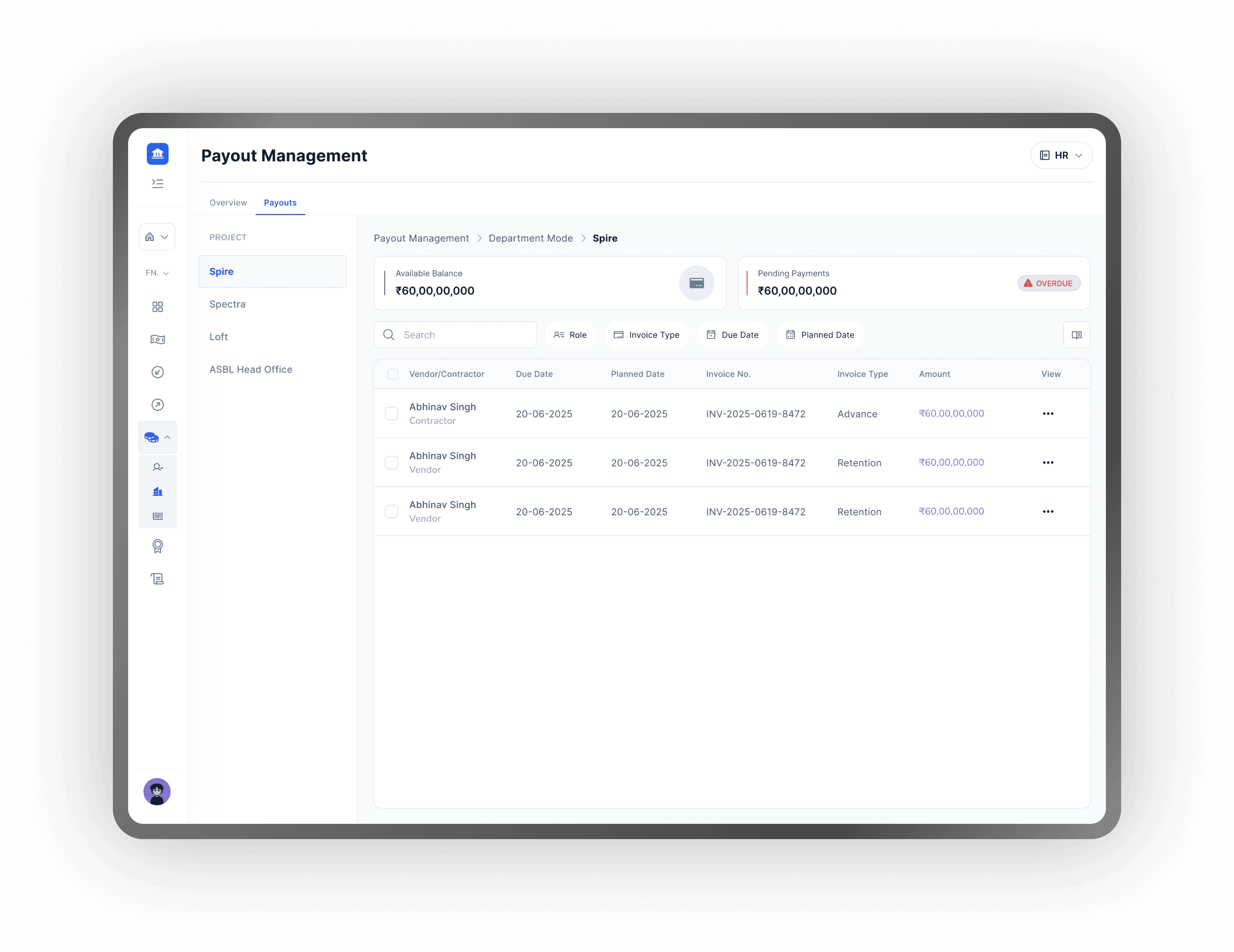
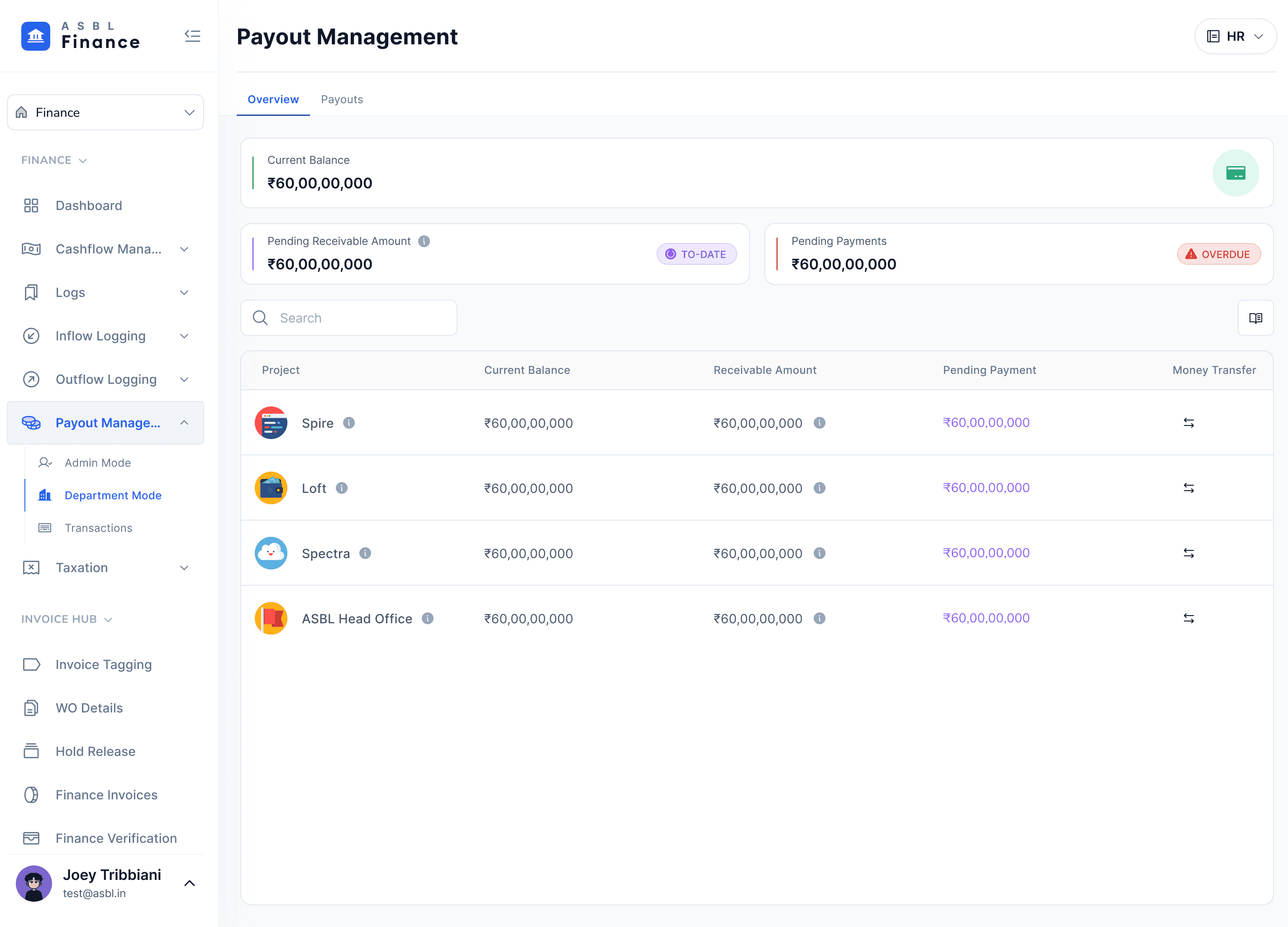
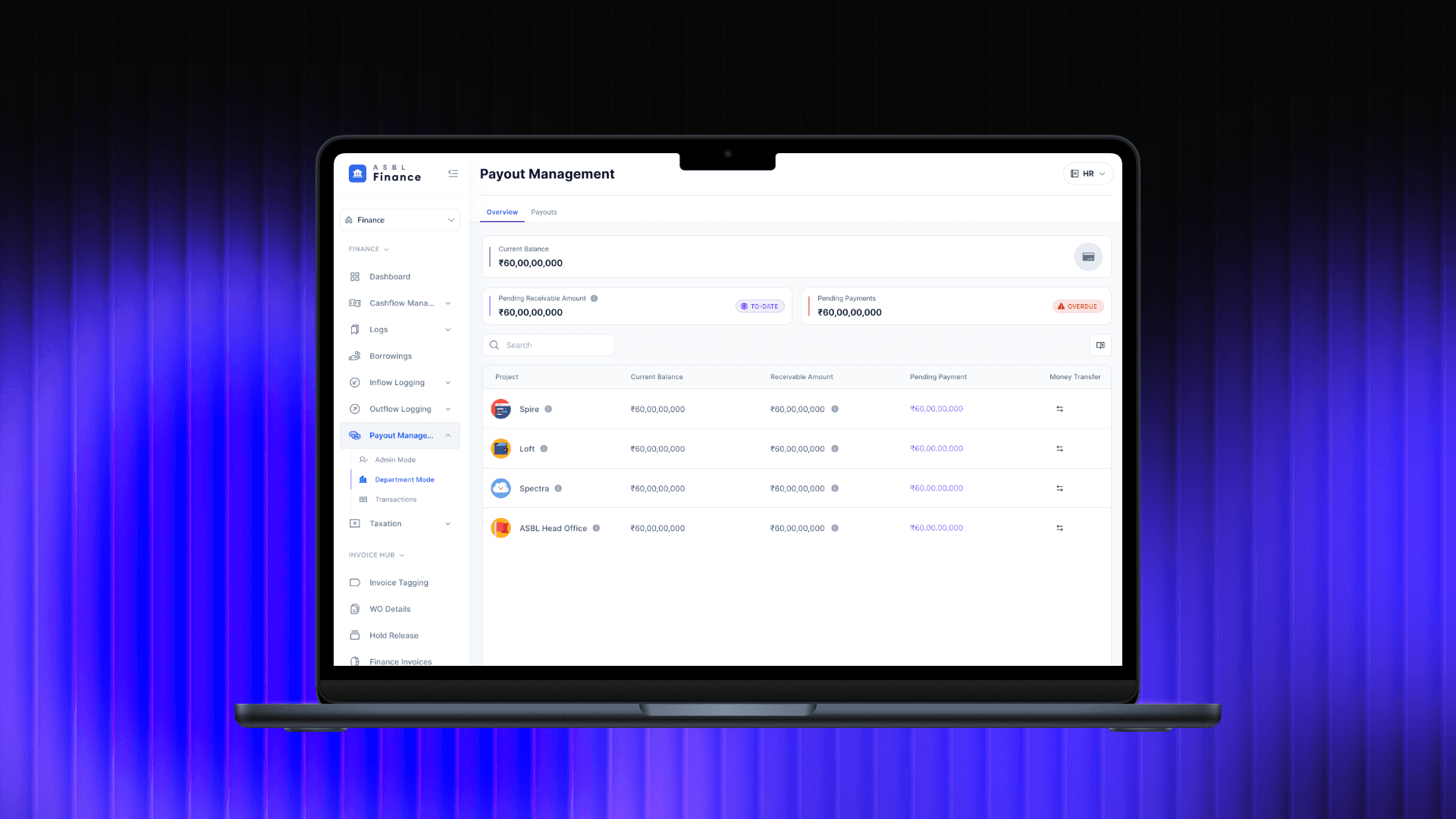
4 · Payout Initiation — Cluster Payments
Multiple invoices can be batched into a single initiation. Available balance, pending payments, and overdue flags shown in real time.
Fewer steps, fewer errors — one flow for multiple payouts
Category mapping auto-links each rupee to the right budget bucket
Overdue alerts surfaced before initiation, not after
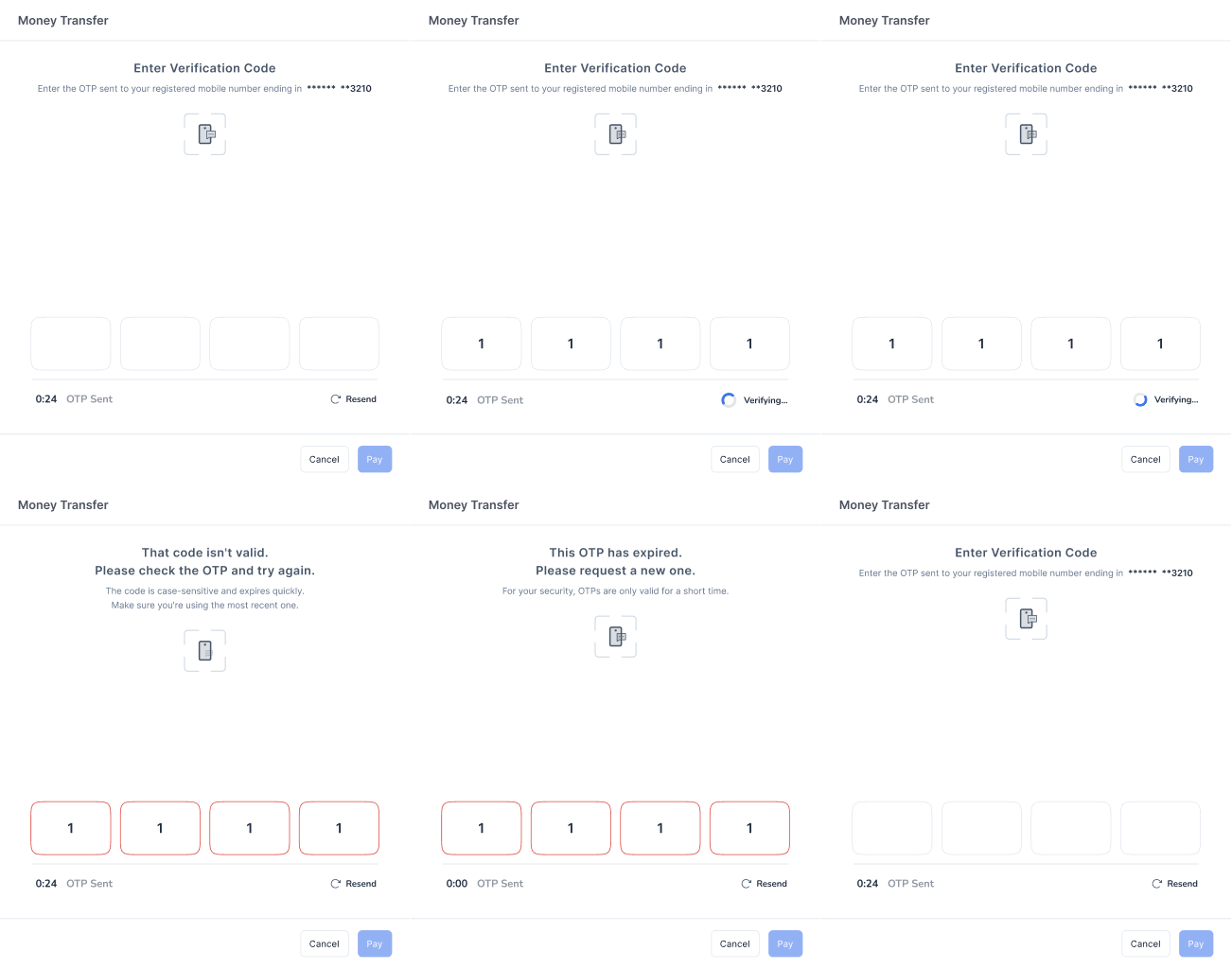
5 · Secure Transfer — PIN + OTP + Auto-Record
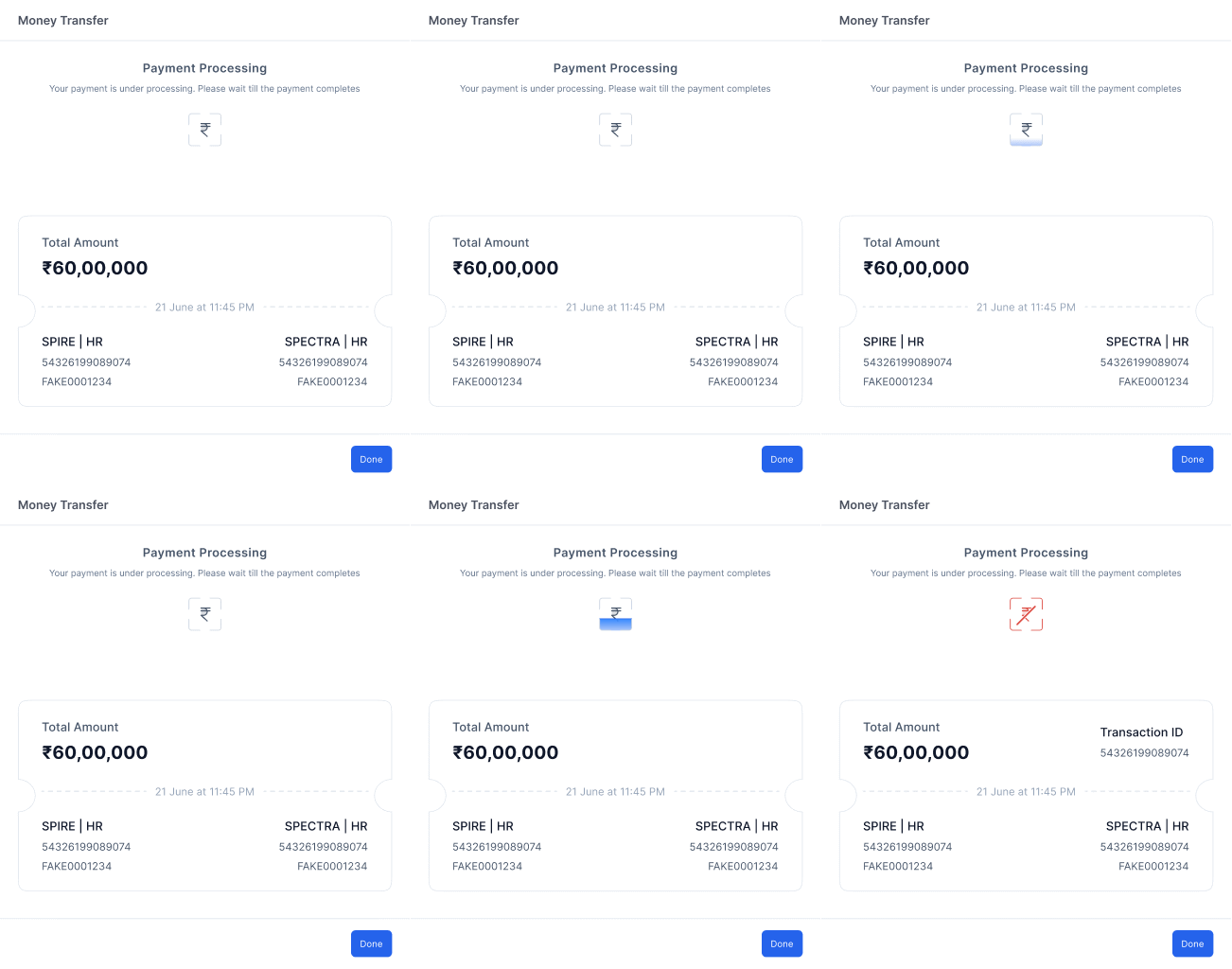
Two-factor auth: 4-digit PIN then OTP to registered mobile. Full transaction record generated automatically, amount, timestamp, project, department.
No informal OTP sharing — everything stays in-app
Transaction receipt auto-created, no manual logging
Bank + system sync happens instantly post-payment
Impact & retrospective
Measured within 2 weeks of launch
8x
faster payout initiation for verified vendors
60%
drop in support tickets related to payment errors
~0
failed bank transfers after verification gating
What worked
Starting with the real workflow not the spec, meant we caught the actual friction points before a single screen was designed.
What I'd do differently
Add telemetry from day one. We knew it worked, but we couldn't see exactly where users slowed down post-launch.
What comes next
Continuous vendor monitoring, confirmation pattern testing for batch payments, and a full audit trail dashboard.
Let's talk
abhinav.design17@gmail.com
ABHiNAV
SiNGH